






How AI Improves Troubleshooting Documentation
Outdated troubleshooting documentation wastes time and slows progress. Engineers spend over half their workdays fixing issues instead of building new features, with 62% losing at least 30 minutes daily searching for solutions. AI changes this by automating updates, improving search accuracy, and offering real-time support.
Key takeaways:
- AI tools use semantic search and Retrieval-Augmented Generation (RAG) for precise answers.
- Automated updates link documentation to code changes, keeping it current.
- Real-world examples show repair times cut by 50% and resource libraries expanded 150x.
- AI assistants summarize troubleshooting steps, turning scattered knowledge into reusable resources.
These advancements reduce error rates, speed up resolutions, and free up engineers to focus on innovation.
Problems with Traditional Troubleshooting Documentation
Outdated Content and Manual Updates
Static troubleshooting documentation struggles to keep up with the fast-paced world of software development. Every time a team rolls out an update, fixes a security issue, or tweaks a dependency, the related guides need to be manually revised. This creates a heavy burden for technical teams.
The cost of falling behind is steep. Live phone support averages over $8.00 per interaction, and live support can be 80 times more expensive than self-service options [9]. Yet, many companies still rely on costly human intervention because their documentation becomes outdated almost as soon as it’s published. Manual updates not only consume time but also lead to errors and inefficiencies [10]. For organizations managing multiple product lines, each with its own troubleshooting requirements, maintaining consistent and accurate documentation across all platforms is nearly unmanageable [9]. These outdated methods make navigation harder, leaving engineers struggling even more during critical incidents.
Poor Navigation and Accessibility
Traditional documentation often feels like a maze, making it frustrating to find the right solution. Engineers waste valuable time sifting through scattered resources on multiple platforms, with no central source of truth [2]. The issue is compounded by conventional search engines that rely on exact keyword matches - requiring 75% or more word overlap to surface relevant results. If your query doesn’t align perfectly with the document's wording, you’re out of luck [5].
"Troubleshooting is still manual and dependent on tribal knowledge. Each incident can feel like starting from scratch." - Chronosphere [3]
A striking example comes from Oracle’s IT Employee Support team. In March 2024, they found that their rule-based Atlassian Assist Slack bot failed so badly that 90% of bot interactions ended in manual support tickets. The bot’s keyword-based system couldn’t pull relevant knowledge from articles to address the 50,000 service tickets they received monthly. This left 140 IT support engineers to manually resolve issues that should have been handled through self-service [11]. Without formalized troubleshooting steps, teams often rely on "tribal knowledge", which significantly slows down resolution times [2][3]. These challenges emphasize the need for smarter, AI-driven tools that can keep documentation up-to-date and make it easier to navigate.
Limited Interactivity and Real-Time Support
Static documentation doesn’t just suffer from poor navigation - it also fails to provide the immediate, actionable help engineers need in critical situations. When an error pops up at 2:00 AM, engineers are left staring at dashboards filled with metrics and logs, with no clear guidance. They often spend 20 minutes or more piecing together data, ruling out false leads, and trying to find the root cause [3].
Legacy systems relying on keyword searches only deliver results for a small fraction of errors. For instance, one organization’s traditional system indexed just 46 articles, while an AI-enhanced system could tap into 150 times more resources [5]. Without real-time, context-aware support, engineers are forced to dig through multiple articles, hoping to stumble upon something relevant. This approach is not only inefficient but also frustrating, as these systems can’t interpret ambiguous queries or tailor answers to specific technical setups [11]. Adding to the frustration, traditional documentation often fails to explain the reasoning behind its suggestions, leaving users doubting the reliability of the guidance [12].
The consequences of these limitations extend beyond documentation. For example, 30% of field service site visits fail to resolve the issue on the first try, often because technicians arrive with incorrect diagnoses or incomplete information [9]. Surprisingly, 14% of these issues don’t even require a technician and could have been resolved with better documentation [9]. These shortcomings highlight the need for systems that offer dynamic, real-time support powered by AI.
sbb-itb-c336128
HAWAT: An AI Assistant for Network Troubleshooting - Karl Newell
How AI Addresses Documentation Problems
AI is transforming how we handle troubleshooting documentation by automating updates, providing tailored guidance, and delivering real-time solutions. It keeps documentation up to date by continuously monitoring development activities like Git commits and support tickets.
Automated Suggestions and Error Explanations
AI tackles documentation challenges by offering immediate, context-aware solutions. Using semantic vector indexing, it quickly identifies the most relevant guides, dashboards, or notebooks [1]. Unlike basic keyword searches, AI understands the context of errors, leading to more precise recommendations. For example, AI-powered tools like Frontline Copilot let engineers type plain-text queries about critical alerts and receive instant, actionable advice [15].
Here’s a real-world example: In April 2025, Outset Medical, a dialysis machine manufacturer, launched a troubleshooting app powered by Tulip AI and Frontline Copilot. Trained on over 2,500 historical repair cases, this system allowed technicians to ask plain-text questions about console alarms. The result? Repair times dropped by 50%, and equipment uptime improved [15]. Similarly, DMG MORI, a global machinery manufacturer, integrated Tulip AI into its equipment interfaces. Operators could troubleshoot complex machines in real time, asking questions in over 20 languages, with AI pulling answers directly from maintenance manuals [15].
"AI agents change the game by embedding documentation into the development lifecycle itself. This shift is powered by an agentic coding studio that bridges the gap between code and documentation. Documentation becomes evergreen by design, not wishful thinking."
Dynamic Content Updates and Predictive Maintenance
AI actively monitors signals like code changes, pull requests, and issue tickets to identify when documentation falls out of sync with the product [8]. It automates updates by linking documentation pages to code changes, generating edits, and summarizing updates for human review [8]. This makes documentation a living part of the codebase, eliminating the risk of outdated information.
The benefits are clear. Teams with poor documentation take 18% longer to roll out new revenue-generating features, while those with well-maintained documentation see a 21% drop in defect rates and a 19% boost in developer productivity [7]. For a 50-developer team, these improvements can save over $375,000 annually by reducing rework [7]. AI tools also ensure API documentation, function parameters, and cross-references stay aligned with the source code, minimizing errors and enhancing efficiency [7][16]. On top of that, AI improves user support by analyzing interactions and adapting to ongoing needs.
User Analytics and Personalized Guidance
AI doesn’t just update content - it also tailors documentation to user behavior. By tracking engagement metrics like search terms and drop-offs, AI identifies gaps and delivers personalized solutions. Semantic search, enriched with context like error stack traces, ensures users are directed to the most relevant resources [5][7][14]. These tools also learn and improve over time by analyzing user feedback and interaction patterns specific to the organization [7].
Instead of relying on traditional keyword searches, AI employs Retrieval-Augmented Generation (RAG) and semantic search for more accurate, context-aware responses [5]. AI assistants allow users to ask natural language questions and get instant, cited answers directly within the documentation interface [14]. For example, when a support team resolves a complex issue, AI can summarize the steps and save them as runbooks, making previously scattered knowledge accessible to everyone [2]. This is crucial, given that 62% of developers spend over 30 minutes daily searching for solutions to poorly documented problems [7].
AI Features That Improve Troubleshooting Documentation
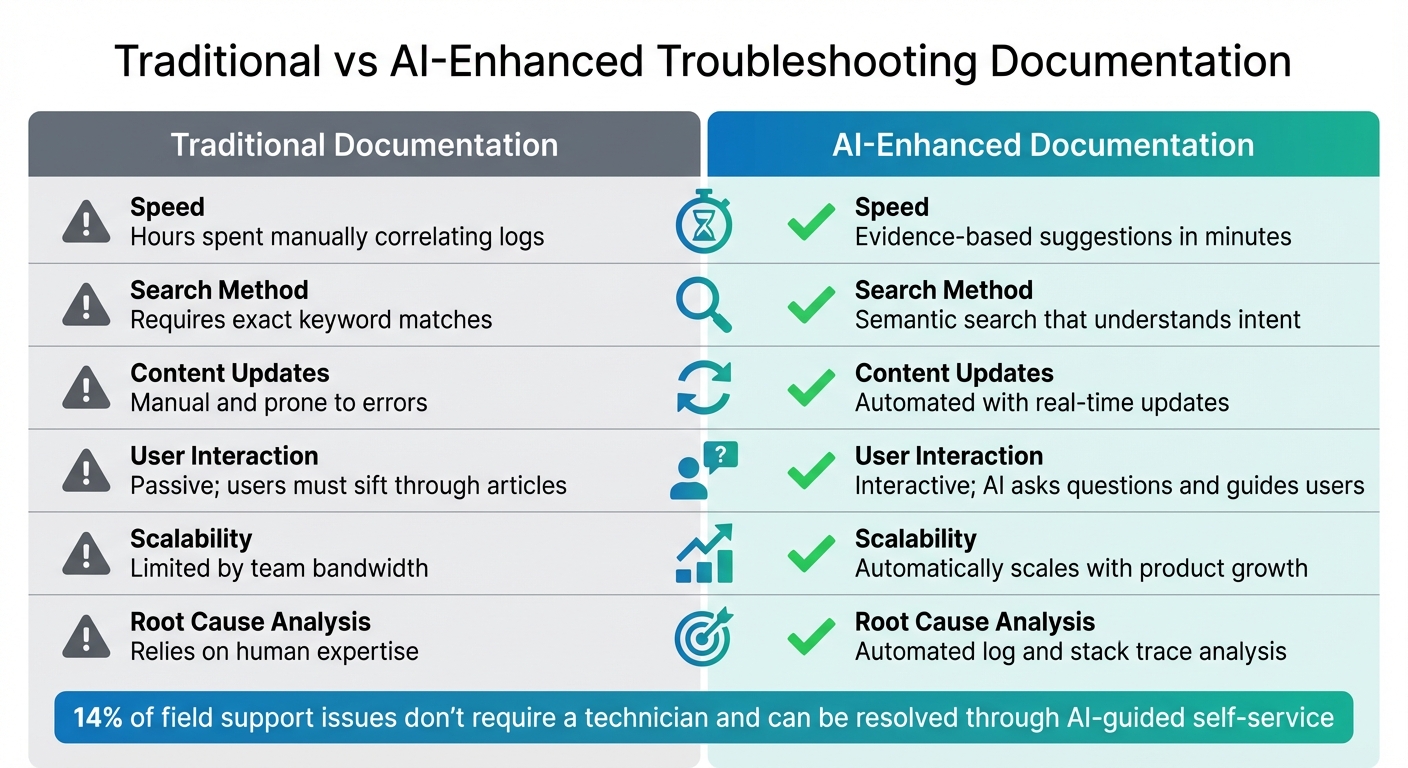
Traditional vs AI-Enhanced Troubleshooting Documentation Comparison
AI-Driven Diagnostics and Root Cause Analysis
AI tools excel at digging through error logs, codebases, and telemetry data to identify the actual source of a problem - rather than just the symptoms. What used to take hours of manual effort can now be done in roughly five minutes, thanks to ranked, evidence-based suggestions provided by these tools [21]. They rely on Temporal Knowledge Graphs, which are dynamic maps of service relationships and infrastructure. These maps help normalize non-standard telemetry data that traditional tools might miss [3] [20].
"While AI has accelerated development, it hasn't accelerated operations. Troubleshooting is still manual and dependent on tribal knowledge."
- Riley Peronto, Sr. Product Marketing Manager, Chronosphere [3]
By delivering rapid diagnostics, these tools enable smoother collaboration among teams during incident resolution.
Multi-Agent Collaboration
AI takes real-time troubleshooting to another level by creating shared, interactive workspaces. For example, Investigation Notebooks automatically log every step of the debugging process. This turns what would have been isolated troubleshooting efforts into reusable knowledge for the entire team. Engineers can also query observability data using plain English, saving them the hassle of memorizing or looking up complex syntax during high-stress situations [3] [20].
These systems maintain a full history of troubleshooting conversations, so when a human steps in, they can see exactly what’s been tried already [22] [23]. AI assistants also summarize these sessions and create runbooks on the fly, making previously scattered expertise available to everyone [2]. This is a game-changer, especially when you consider that experienced engineers often spend over 20 minutes manually matching patterns for just one incident [20].
Comparison: Traditional Methods vs. AI-Enhanced Documentation
Here’s a side-by-side look at how AI-enhanced troubleshooting stacks up against traditional methods:
| Feature | Traditional Documentation | AI-Enhanced Documentation |
|---|---|---|
| Speed | Hours spent manually correlating logs [21] | Evidence-based suggestions in minutes [20] [21] |
| Search Method | Requires exact keyword matches [5] | Semantic search that understands intent [5] |
| Content Updates | Manual and prone to errors [17] | Automated with real-time updates [5] [19] |
| User Interaction | Passive; users must sift through articles [23] | Interactive; AI asks questions and guides users [23] |
| Scalability | Limited by team bandwidth [17] | Automatically scales with product growth [17] [18] |
| Root Cause Analysis | Relies on human expertise [9] | Automated log and stack trace analysis [22] [5] |
Interestingly, up to 14% of field support issues don’t even require a technician and can be resolved through AI-guided self-service [9]. These advancements not only speed up diagnosis and improve teamwork but also lay the groundwork for deeper AI integration into troubleshooting workflows. This evolution is part of a broader shift toward AI-native systems that bridge the gap between ideas and operational reality.
How to Implement AI in Troubleshooting Documentation
Selecting the Right AI Tools
Choosing the right AI tools is key to saving time and improving the quality of your troubleshooting documentation. It’s important to verify the technical accuracy of these tools and safely test code snippets before putting them into action [24]. Teams should always cross-check AI-generated suggestions against trusted documentation and ensure any advice aligns with established technical standards [24].
When working with Large Language Models (LLMs), it’s crucial to understand their data policies, especially if your documentation involves sensitive infrastructure details or customer information [2][24]. Tools with Retrieval-Augmented Generation (RAG) capabilities are particularly useful, as they pull real-time data from your own vector database rather than relying solely on outdated training data [6]. For example, the paid version of Claude can process up to 500 pages of text in one go, while OpenAI’s GPT-4o handles around 300 pages [6].
Integrating AI into Documentation Workflows
A phased approach works best for integrating AI into your documentation workflows. Start small by using chat interfaces, then expand to shared prompt libraries, and eventually incorporate AI into your CI/CD workflows through APIs [6]. For instance, GitLab’s support engineers rolled out ZenDuo, a Duo integration in Zendesk, in January 2026. This tool condensed a complex customer ticket about token expiry notifications into eight actionable points, significantly reducing handover time and speeding up resolution [24].
To make AI recommendations more relevant, provide internal context like runbooks, GitHub issues, Slack messages, and technical specifications [2][6]. Automating updates is another game-changer. For example, you can use GitHub Actions to refresh your database with new documentation embeddings whenever a Pull Request is made [25]. Similarly, tools like Dynatrace’s Davis CoPilot, launched in July 2025, automatically re-index troubleshooting guides every six hours using semantic vector indexing [1].
Standardizing your documentation is equally important. Use specific prefixes like [TSG] for Troubleshooting Guides and share documents at the environment level for better organization [1][4]. Build a shared prompt library tailored to different tasks - such as Issue Analysis, Solution Research, or Customer Communication - to maintain consistency across your team [24][6].
These strategies help streamline the transition from manual updates to a fully AI-integrated documentation process.
Ensuring Scalability and Continuous Improvement
Scalability and ongoing refinement are essential for long-term success. Automation and human oversight should work hand in hand to ensure efficiency. For example, in February 2025, Boomi upgraded its "Resolve" troubleshooting feature to a RAG-based "Resolve Agent", powered by Amazon Bedrock and Claude 3.5 Sonnet. This new system indexed 150 times more resources and periodically re-indexed data using OpenSearch and a SageMaker-hosted re-ranker [5].
To prevent valuable knowledge from being lost, AI assistants can summarize successful troubleshooting conversations and store them in your Knowledge Base for future use [2]. This practice helps capture "tribal knowledge" and keeps it accessible to the entire team.
Keep an eye on efficiency metrics to ensure AI tools are genuinely saving time. If team members spend more time crafting prompts than solving issues, it’s a sign the workflow needs adjustment [24]. Regularly review and update runbooks to eliminate outdated information, and use concise bullet points and links to fit within LLM token limits [2].
"Use AI to build upon your existing knowledge and responses, not to replace your thinking." – GitLab Support Team [24]
Conclusion
High-quality AI troubleshooting documentation brings real, measurable benefits. Companies that invest in robust documentation see a 21% drop in defect rates and a 19% increase in developer productivity [7]. On top of that, AI tools cut documentation time in half, allowing teams to spend more time building and innovating rather than hunting for answers. Considering that 62% of developers spend over 30 minutes daily searching for poorly documented solutions [7], these efficiency gains are a big deal.
This shift is also redefining how troubleshooting is done. Moving away from traditional keyword-based searches, AI introduces semantic understanding, fundamentally changing how teams address issues. Instead of starting from scratch with each incident, AI-driven systems use Retrieval-Augmented Generation (RAG) to deliver context-aware solutions by referencing runbooks and past resolutions [2][5]. This not only speeds up problem-solving but also safeguards critical institutional knowledge.
"This ability to retrieve, summarize, and present contextually relevant information is a game-changer for SRE teams, transforming the work from chasing documents and data to an intuitive, contextually sensitive user experience."
The financial impact is equally compelling. Even small productivity improvements lead to significant savings. Companies with poor documentation practices take about 18% longer to release new features compared to those with mature systems [7]. In fast-paced industries, that delay can be the difference between leading the market and playing catch-up.
Tools like ClackyAI demonstrate how AI-powered solutions can revolutionize documentation. By integrating real-time diagnostics with collaborative workflows, these tools turn static documentation into dynamic, actionable resources. Whether it’s using RAG to harness private data or automating semantic indexing every six hours, the technology is already here to transform troubleshooting documentation into a strategic advantage.
FAQs
How does AI make troubleshooting documentation more accurate and efficient?
AI transforms troubleshooting documentation by taking on repetitive tasks and offering smart suggestions. For instance, it can swiftly pinpoint and recommend the most relevant guides or solutions tailored to a specific issue. This not only saves time but also reduces the effort required to track down answers. By analyzing patterns and data, AI ensures teams can quickly access the information they need, cutting downtime and boosting overall efficiency.
Another advantage is AI's ability to keep documentation current and accurate. It dynamically updates content as new solutions arise, ensuring troubleshooting guides always reflect the latest practices. On top of that, AI tools can organize vast amounts of data into clear, actionable formats, making it easier for users to find their way and resolve issues with confidence.
How does AI enhance troubleshooting support in real-time?
AI has transformed real-time troubleshooting by pinpointing root causes with impressive speed. Using advanced analytics and contextual system understanding, it minimizes downtime and boosts efficiency. It can also pull up relevant troubleshooting guides instantly, streamlining resolutions and promoting better knowledge sharing within teams.
Take tools like ClackyAI, for instance. They elevate support by seamlessly blending into workflows, delivering dynamic updates, and continuously improving processes over time. This approach ensures troubleshooting documentation remains precise, practical, and aligned with the demands of day-to-day operations.
How can AI tools make troubleshooting documentation easier to scale and maintain?
AI tools are changing the game for troubleshooting documentation by automating updates, boosting precision, and making content more interactive. They can handle updates automatically as products change, cutting down on the need for manual revisions and keeping information up-to-date effortlessly. Plus, AI organizes data in smart ways, making it easier for users to search and find what they need.
On top of that, AI-powered systems can analyze user questions in real time and deliver relevant troubleshooting guides, simplifying the support process. These tools can spot trends, tweak content based on user behavior, and improve readability, ensuring the documentation stays easy to use and scalable as needs grow. With AI, teams can keep resources accurate, current, and effective without putting in as much effort.