






Market Validation For SaaS: First 100 Users
Your first 100 users are critical for validating your SaaS product. They provide real feedback, help refine your product, and prove that your solution solves a meaningful problem. Here's what matters most:
- Why 100 Users? It shows strangers find enough value to pay for your product, a step toward product-market fit.
- Early Adopters' Role: They help identify gaps, refine your Ideal Customer Profile (ICP), and may become your strongest advocates.
- Steps to Get 100 Users:
- Define your ICP by focusing on specific pain points and customer segments.
- Build a simple Minimum Viable Product (MVP) targeting a core problem.
- Use personal networks, cold outreach, and niche communities to attract users.
- Focus on onboarding and feedback to improve your product quickly.
This guide outlines how to acquire, retain, and learn from your first users to set the foundation for growth.
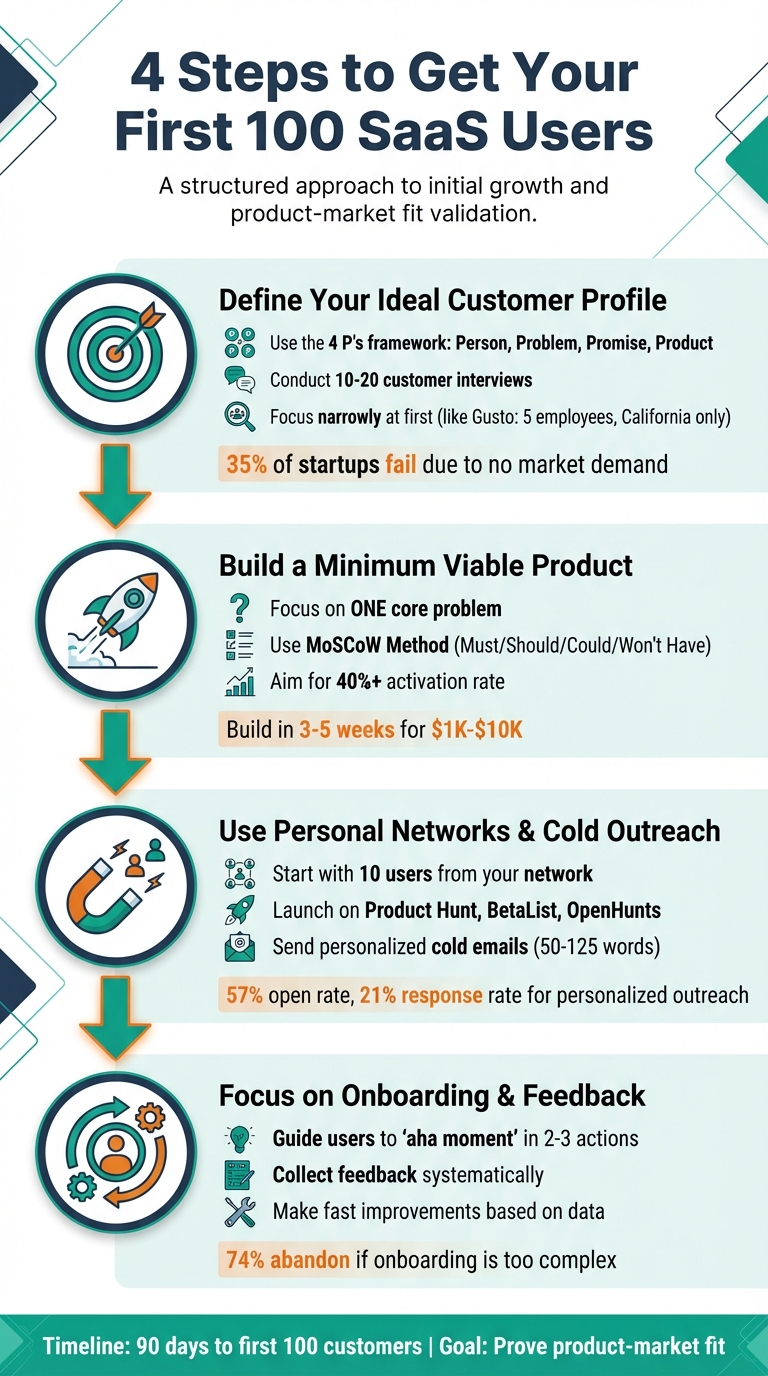
4-Step Process to Acquire Your First 100 SaaS Users
My SaaS User Growth System: Get Your First 100 - 1,000+ Users
Define Your Ideal Customer Profile (ICP)
Your Ideal Customer Profile (ICP) isn’t just “anyone with money to spend.” It’s the specific individual or company that looks at your product and feels like it was designed specifically for them [11]. Defining your ICP helps you avoid wasting resources chasing leads that don’t fit. Consider this: 35% of startups fail because they create products for which there’s no actual market demand [14].
Start by forming a hypothesis based on the "4 P's": Person (who will use or buy your product), Problem (their pain point), Promise (how you solve it), and Product (what you’re offering) [11]. For B2B SaaS, refine this further by factoring in firmographics like company size, industry, revenue, and the tools they already use - whether it’s Salesforce, HubSpot, or custom-built solutions. These details shape how your product fits into their workflow [9].
Focus narrowly at first. For example, Gusto’s co-founder Tomer London began by targeting only small California-based companies with five or fewer employees, no benefits, salaried staff, and a specific eight-day payroll delay. This laser focus helped them perfect their niche before scaling to serve over 300,000 businesses [12].
"We did not think about ICP. I wish we did earlier on. It's one of my biggest mistakes."
Validate your ICP by conducting 10–20 open-ended interviews with potential users [13][14]. Ask questions like, “What workarounds are you using to manage this?” to uncover existing inefficiencies [1]. If cold emails to a specific segment yield no responses, it’s a sign that the problem you’re addressing isn’t a priority for them [19]. For instance, Retool’s founder David Hsu initially targeted FileMaker developers, only to find they were resistant to change. He pivoted to targeting frontend and backend developers using React or JavaScript at large companies. This shift helped Retool secure 40 customers and $2 million in ARR before their public launch [11].
How to Find Customer Pain Points
The best pain points are often found where your target audience airs their frustrations. Explore niche communities like Reddit, Discord, Slack channels, and Twitter. Look for phrases like “I hate how [competitor] doesn’t…,” “Does anyone know a tool that…,” or “Why isn’t there an app for…” [6]. These candid complaints reveal genuine frustrations that surveys might miss.
Check negative reviews of competitors on platforms like G2, Capterra, or Twitter. Look for recurring issues - such as clunky onboarding, missing integrations, or poor customer support. These gaps, or “positioning wedges,” highlight where competitors fall short and where you can stand out [1][15].
When speaking with potential users, try the "Magic Wand" technique: ask, “If you could wave a magic wand and solve your biggest problem in [area], what would you fix?” [10]. Before these conversations, prepare a hypothesis about the top three pain points and desired outcomes for your target persona, and use the interviews to confirm or challenge your assumptions [10].
In 2025, founder Sarah used this approach for her task management SaaS. She posted in r/productivity and GTD forums while sharing daily “build in public” updates on Twitter. By focusing on productivity psychology in niche spaces, she attracted 127 users and reached $1,200 in monthly recurring revenue within just eight weeks [6]. With customer acquisition costs skyrocketing 10× since 2020, organic, community-driven growth is now more important than ever [13].
Identifying these pain points is critical for creating actionable user personas.
Create Detailed User Personas
A user persona goes beyond surface-level demographics; it captures the behaviors, goals, and decision-making processes of your ideal customer. For B2B SaaS, it’s essential to distinguish between your Ideal Customer Profile (the company level: industry, size, tools used) and your Buyer Persona (the individual decision-maker: their role, priorities, and communication style) [17]. This dual approach helps you understand not only which companies to target but also who within those companies will ultimately sign the deal.
To create these personas, follow a structured process. Conduct surveys and interviews to gather both quantitative data and qualitative insights. Perform keyword research to understand the language your audience uses. Continuously refine your personas as market conditions shift [18]. Recording interviews with tools like Zoom or Calendly can also help onboard new team members.
Take Snyk as an example. They initially focused on a persona defined as a Node.js developer who prioritized security. By narrowing their focus to the Node ecosystem, they crafted messaging that resonated deeply with this audience before expanding to other languages like Golang or Rust [12].
"You need to get to know a singular buyer profile well enough that you can refine your sales pitch for similar high-value prospects."
- Meka Asonye, Partner, First Round [11]
Leverage tools like 6sense or Clearbit to automate the collection of firmographic and tech stack data, integrating it into your CRM as a reliable source [9]. Monitor trigger events - such as a startup landing its first enterprise client or reaching a specific employee count - that indicate when a prospect might need your solution [11].
Once you’ve refined your personas, test them in active communities.
Use Communities to Test Your ICP
Communities are the ultimate testing ground for your ICP. Join niche subreddits, Slack channels, LinkedIn groups, and Twitter threads where your audience already spends time. Your goal isn’t to pitch but to listen - observe their language and frustrations [10][13]. Peer recommendations now outperform traditional marketing by a staggering 16:1 ratio [13], making credibility in these spaces more valuable than any ad campaign.
Use Twitter search to find users complaining about competitors (e.g., “Salesforce is complicated”) and reach out to learn more about their pain points [16]. A personalized cold email offering a 10-minute “idea share” has shown a 57% open rate and a 21% response rate [16]. This approach works because it respects the recipient’s expertise and seeks honest feedback.
Test your ICP on platforms like OpenHunts or BetaList [6]. Jessica, for example, launched her design resource platform through community-focused initiatives, acquiring 150 active users in six weeks [6]. Similarly, FrontApp gained 400 high-quality signups in just two days by featuring on BetaList [16]. Outbound sales data is another strong indicator of ICP accuracy. The founders of Kubecost, for instance, conducted over 120 interviews in two months to validate their product idea [19].
A well-defined ICP lays the groundwork for scaling your user base and gaining market traction.
Build and Launch a Minimum Viable Product (MVP)
Once you've nailed down your Ideal Customer Profile (ICP) and pinpointed the problems they need solved, it's time to create your MVP. The goal? Prove your solution works for a specific problem - and do it fast. Focus on what’s essential, and leave the rest for later.
Focus on Core Features Only
Your MVP should address one pressing issue so effectively that users would rather pay for it than stick with their current, patchwork solutions. Look for areas where users are already making do with makeshift fixes, like spreadsheets or cobbled-together tools. These are often the clearest indicators of what’s truly necessary [20].
To prioritize features, try the MoSCoW Method:
- Must Have: Features your product can't function without. These form the backbone of your MVP.
- Should Have: Important, but not essential for the first version.
- Could Have: Nice-to-have extras that can wait.
- Won't Have: Features that are explicitly out of scope for now [20].
Take Dropbox, for example. In its early days, it focused solely on syncing a single file between a folder and the cloud. Additional features came later, but that one core function was enough to get users on board [20].
You can also validate your idea with a Concierge MVP. This involves manually solving the problem - using spreadsheets or other simple tools - to identify what needs automation. This approach worked for Belly, a customer loyalty platform, which signed up 500 local businesses in Chicago through face-to-face interviews before even building their first product iteration [5]. Aim for an activation rate of 40% or higher - meaning users experience the core value during onboarding - before shifting your focus to scaling acquisition [2].
"At the start, recruit users manually and give them an overwhelmingly good experience. Then they'll tell their friends."
- Paul Graham, Co-founder, Y Combinator [2]
Once you’ve nailed down your lean feature set, it’s time to speed up development.
Tools to Speed Up MVP Development
No-code platforms like Bubble, Webflow, and Softr allow you to build functional apps in just 2–4 weeks, even without a full engineering team [22]. If you're creating a mobile app, tools like Adalo, Glide, and Thunkable make rapid deployment possible [22]. For instance, in 2024, development agency Sommo launched Dyvo, an AI-powered avatar creator, in just four weeks using no-code tools [22].
If you need more control and scalability, AI-powered platforms can be a game-changer. ClackyAI (https://clacky.ai) is a full-stack AI coding agent that helps founders build and launch software products. Unlike basic code generators, it provides everything you need to go live - authentication, databases, payment systems, and more. Starting at $29/month, it’s a cost-effective option for small teams needing to iterate quickly based on user feedback.
For backend automation, tools like Airtable or Google Sheets can act as initial databases, connected through Zapier or Make to streamline workflows [22]. Most no-code tools can handle hundreds of thousands of users, which is more than enough for the majority of MVPs [22]. Using these methods, you can typically build an MVP in 3–5 weeks for $1,000 to $10,000 - a fraction of the time and cost of traditional development [22].
"The fastest way to waste time is to build quietly. The fastest way to build something valuable is to ship early, listen hard, and iterate."
- Vicky Ijade, SaaS Founder Guide [20]
Now let’s look at how to launch your MVP and attract those crucial early users.
Launch Your MVP Effectively
Launching your MVP isn’t about achieving perfection - it’s about testing your hypothesis. Start by using platforms like Product Hunt, BetaList, and OpenHunts to attract early users. One founder reported gaining 1,800 site visits in the first week just by launching on these platforms [1]. For Product Hunt, Tuesdays and Wednesdays tend to get the most traction [1].
Before diving into paid ads, focus on manual outreach. Engage with niche communities where your ICP is already active [5].
Slack took a similar approach in its early days. By beta-testing with just 6–10 companies, they closely observed how users interacted with their messaging features before rolling out to a broader audience [5].
Another effective strategy is creating a simple landing page with a waitlist. This allows you to gauge demand and collect emails before your full launch [20]. While tools can help you set up a landing page in minutes, acquiring your first 100 customers often takes around 90 days [21]. The key is to learn whether people will actually use what you’ve built and use their feedback to guide future iterations. Early users are your best source of insight as you refine your product.
sbb-itb-c336128
How to Get Your First 100 Users
After launching your MVP, the next big milestone is attracting your first 100 users. This process is all about hands-on, founder-led outreach, starting with people you know and expanding through targeted efforts and strategic content.
Tap Into Your Network and Communities
Your first 10 users should be familiar faces - former colleagues, friends, or beta testers who understand the problem you're solving [3][8]. Instead of pitching directly, ask, "Do you know anyone who struggles with this?" This softer approach often leads to more opportunities than a direct sales pitch [3].
Keep things organized by creating a simple spreadsheet to track every potential user and your interactions [2][8]. For these early adopters, go the extra mile with concierge-style onboarding. Help them with setup, data cleanup, or integrations to ensure they see value quickly. This personal touch builds trust and gives you valuable feedback on what works and what doesn’t [2][8]. Warm introductions from your network are especially effective, as they leverage existing trust [8].
To incentivize these early users, consider offering a Founding Member deal, such as lifetime access for $49. This not only creates urgency but also makes them feel like partners in your journey.
"It's better to have 100 users who love you than 1,000 who like you. Start with a small market you can dominate."
- Sam Altman, Former President, Y Combinator [2]
Sharing your progress on LinkedIn or Twitter (X) can also attract signups. Professional connections often want to support your journey [1]. If someone doesn’t respond, don’t take it personally - send a brief follow-up once or twice a week to stay on their radar [8].
When you’ve exhausted your personal network, it’s time to move on to cold outreach.
Cold Outreach That Delivers
Cold outreach is a key strategy once your immediate network is tapped. But forget mass emails - success lies in micro-segmentation. Start by creating small, targeted lists of around 200 verified contacts. These could be based on triggers like companies hiring for a specific role or using a particular tech stack [4].
Personalize every email. Reference a recent company achievement, a known pain point, or a trigger event like a new hire [4][25]. Keep it short - 50 to 125 words - and focus on measurable outcomes. Use a low-pressure call-to-action, such as, "Can I show you a 12-minute demo?" [4][25].
A great example comes from 2011, when Zapier co-founder Wade Foster sent a personalized email to Andrew Warner, founder of Mixergy. After spotting a technical question on a forum, Wade reached out. Although Andrew had already solved the issue, the email sparked a conversation that led to Zapier building a requested integration. Andrew Warner became Zapier’s first paying customer [26].
Follow-ups are crucial. Email sequences can increase reply rates by 22% to 40% compared to single emails [25]. For early-stage SaaS, aim for a 3% to 8% reply rate and a 1% meeting rate [4]. To avoid email deliverability issues, start small - send 1 to 5 emails per day initially, then gradually ramp up to 15 to 30 emails daily by day 20 [4].
"The goal of a cold email is not an instant conversion, but building the relationship from strangers to business partners."
- Margaret Sikora, Woodpecker [25]
When personalized outreach reaches its limits, supplement it with targeted content.
Content Marketing and Paid Ads
For your first 100 users, content marketing isn’t about dominating Google search results. Instead, focus on creating resources that answer specific questions you find in Reddit threads, Discord channels, or Slack groups [24]. Share real experiences, including mistakes, to build trust and relatability [6]. When engaging in these communities, provide a thorough solution in your response and only link to your content as an optional deep dive [24].
A case in point: In 2024, Sarah, a founder of a task management tool, gained 127 users and reached $1,200 MRR in just eight weeks. Her strategy? Weekly articles on productivity psychology, daily updates on Twitter (#buildinpublic), and launches on platforms like OpenHunts and BetaList [6]. Similarly, Nathan Barry, founder of ConvertKit, documented his journey in "The Web App Challenge", which drew in professional bloggers facing similar hurdles [5].
Paid ads, while not ideal for your very first users, can be a useful tool for testing your value proposition. Platforms like X (for tech audiences), Google (for search intent), or Bing (for lower costs) can work well for lean campaigns [23]. Keep track of key metrics like Customer Acquisition Cost (CAC) and conversion rates. Email marketing remains a standout performer, with a reported return of $36 for every $1 spent [4].
"Your first 100 SaaS customers come from disciplined outbound and founder-led selling, not ads."
- Hans Dekker, Founder, Instantly.ai [4]
Stick to one or two platforms for 100 days, reusing posts that spark the most engagement. The goal isn’t to be perfect - it’s to stay visible and learn what resonates with your audience. These methods not only attract users but also help you refine your product’s fit in the market.
Onboard Users and Improve Based on Feedback
Once you've secured your first 100 users, the next challenge is ensuring they stick around long enough to experience the value your product offers. Signing up users is just the start; retaining them requires a thoughtful approach to onboarding and a commitment to continuous improvement. Did you know that 74% of potential customers will abandon a product if the onboarding process is too complicated? [27] That’s why a smooth onboarding process is critical - it not only helps users find value quickly but also provides a foundation for gathering meaningful feedback.
Create a Simple Onboarding Process
The goal of onboarding is simple: guide users to their "aha moment" as quickly as possible. This is the moment when users truly understand how your product solves their problem. Focus on just 2–3 core actions that deliver immediate value [27].
Reduce friction wherever possible. For instance, offer social login options like Google or Microsoft instead of lengthy forms. Collect information gradually, asking only a few targeted questions during signup to understand the user’s role and needs. This allows you to tailor the onboarding experience to their specific goals [27][28].
Interactive walkthroughs are far more engaging than passive product tours. Encourage users to take meaningful actions during onboarding. For example, in 2025, Attention Insight replaced its passive tour with an interactive guide that prompted users to create their first heatmap. This change boosted activation rates by 47% and led to 69% of users completing key onboarding tasks [27]. Why does this work? Interactive experiences help users retain 90% of the information, compared to just 10% from passive reading [27].
Visual cues like checklists and progress bars can keep users motivated. Celebrate small wins with animations or encouraging messages when they complete a step. Duolingo’s progress visualization system is a great example - it helped raise next-day retention from 12% in 2012 to about 55% by 2025 [27].
For your first 100 users, consider a hands-on approach. Founders personally handling onboarding and support can uncover valuable insights and build strong relationships with users [2][3]. High-touch onboarding, such as assisting with setup or integrations, can also help identify areas for improvement.
"At the start, recruit users manually and give them an overwhelmingly good experience. Then they'll tell their friends." - Paul Graham, Co-Founder, Y Combinator [2]
Additionally, in-app resource centers with FAQs and tutorials can empower users to solve problems independently. For example, Osano introduced a Resource Center with smart page-triggering to display relevant help articles. This reduced support tickets by 25% and improved user satisfaction [27].
Collect and Use Feedback
Feedback is your secret weapon for continuous improvement - but only if you gather it systematically and act on it. Consolidate feedback from all channels - emails, social media, in-app messages, and support tickets - into a single repository like a shared spreadsheet or a feedback management tool [30].
Make it easy for users to share their thoughts. Add "Have feedback?" links or widgets on every page, and use exit-intent popups to ask if anything was missing [1]. Tools like in-app surveys and Net Promoter Score (NPS) questions can help gauge user sentiment and identify recurring pain points. For instance, if several users mention difficulty locating a feature like the export button, that’s a clear signal to make it more accessible.
Combine qualitative feedback with quantitative data. Funnel analysis can reveal where users drop off during onboarding, while event tracking monitors specific actions like button clicks or form submissions [31][34]. Session recordings and heatmaps are also incredibly useful - they show where users hesitate or get stuck [31][32]. Tools like UXCam, Hotjar, and Mixpanel can help you track these insights, but even a simple activation milestone tracker can be effective in the early stages.
When prioritizing feedback, use an objective framework to decide what to tackle first:
| Prioritization Criterion | Description |
|---|---|
| Frequency | How often users mention the issue or request |
| Severity | Whether it’s a minor inconvenience or a major blocker |
| Business Impact | The potential effect on revenue or retention |
| Feasibility | How easily the issue can be resolved with available resources |
| Sentiment | The emotional tone or urgency behind the feedback |
Focus on feedback from users who align closely with your Ideal Customer Profile (ICP). When addressing negative feedback, dig deeper to uncover root causes instead of just patching surface-level issues [30].
Make Fast Improvements
Once you’ve gathered feedback, the next step is to act on it - quickly. Your first 100 users are likely to forgive small imperfections if they see you’re actively improving the product. Just as you worked to achieve a 40%+ activation rate with your MVP, aim for the same during onboarding. Activation rate refers to the percentage of users who achieve the core value during onboarding, and it’s a key metric for retention [2].
Start by addressing the most common and severe issues. If multiple users report the same bug or friction point, fix it immediately. Communicate updates to your users - it builds trust and shows you’re listening.
For larger changes, test before committing. A/B testing can help you determine whether a new feature or interface tweak actually improves user behavior. For instance, if users request a redesigned dashboard, test different layouts with a subset of new signups to see which one performs best.
Behavior-based emails are another powerful tool. Instead of sending generic, time-based messages, trigger emails based on user actions. For example, if someone hasn’t engaged with a key feature, send them a quick-start guide or offer a one-on-one call to help them get started [29].
Keep a close eye on two critical metrics: Activation Rate (how many users achieve core value) and Time to Value (how quickly they get there) [2]. These metrics provide a clear picture of your onboarding effectiveness. Even small changes can have a big impact - like when Expedia removed an optional "Company" field from its booking form, leading to $12 million in additional annual revenue [27].
"Great onboarding isn't about showing users every feature you've built. It's about guiding them to that magical 'aha moment' where your product clicks." - Yuliia Bulkovska, Writer, Eleken [27]
For more complex products, tools like Userpilot or Appcues can help you design interactive onboarding experiences without requiring code [33]. However, for your first 100 users, manual, hands-on improvements often yield the most valuable insights and create lasting connections with your early adopters.
Conclusion: From 100 Users to Growth
What You Learn from Your First 100 Users
The first 100 users are like a crash course in understanding your product's real-world impact. Engaging directly with them reveals gaps in your messaging and helps you figure out which parts of your positioning click - and which don’t. You’ll also uncover the exact language they use to describe their challenges, giving you a clear path to refine your communication and resonate better with future prospects [24] [35].
These early adopters also shed light on which customer segments bring the most value over time and which ones drain resources without contributing enough in return. With this data, you can sharpen your Ideal Customer Profile (ICP) and focus on the areas of your product that matter most to your core audience [5].
"The money will come if you pay very close attention to those early customers and adapt to their feedback quickly." - Peter McKay, CEO, Snyk [35]
The relationships you build with these users go far beyond just short-term revenue. Their feedback and the insights you gain from onboarding them hands-on are invaluable for scaling. Observing how they interact with your product - beyond the metrics in your dashboard - can reveal friction points and opportunities for improvement that might otherwise go unnoticed [5].
How to Scale Beyond 100 Users
Once you’ve learned from your first 100 users, the next step is turning those lessons into repeatable strategies. Document what worked during your initial outreach and create a playbook to systematize your approach. This shift from manual, scrappy efforts to structured processes is what separates companies that plateau from those that grow [36].
To scale efficiently, create resources that work for you 24/7 - like blog posts, templates, or tools. For instance, in 2012, DigitalOcean’s CMO Mitch Wainer secured a TechCrunch feature that skyrocketed the company’s daily signups from 10 to over 100. Paired with a referral program and a steady stream of tutorials (20+ per month), DigitalOcean grew to 130,000 users in just two years [38].
Building on the trust of your early adopters, a referral program can be a game-changer. Offering incentives like subscription credits or commissions can turn your first users into enthusiastic advocates [38]. Use the data you’ve gathered to zero in on the customer segments with the highest Lifetime Value (LTV) and focus your marketing efforts there [5] [38]. A solid SaaS business typically aims for an LTV:CAC ratio between 3:1 and 5:1 [7].
"Every software company with 10 paying customers gets to a hundred, and every company with a hundred gets to a thousand. We just have to execute on this." - Patrick McKenzie, Founder and Stripe Atlas Lead [36]
Scaling from 100 to 1,000 users often takes 6–12 months, even without heavy reliance on paid ads [37]. During this phase, it’s crucial to fine-tune your funnel. Experiment with A/B testing on elements like call-to-action buttons, pricing strategies, and landing page layouts to boost conversions [5] [38]. Consistently producing problem-solving content - around 20 posts per month - can also help build a reliable marketing engine [38]. Your first 100 users proved your concept works; now it’s time to make growth a predictable process. If you're ready to build, you can launch your own SaaS without writing a single line of code.
FAQs
How do I identify the Ideal Customer Profile (ICP) for my SaaS product?
To figure out your Ideal Customer Profile (ICP), start by pinpointing who gains the most from the problem your SaaS product solves. Think about the pain points your solution addresses and connect them to specific traits like job roles, company size, industry, annual revenue, or even the tools they already use. Dive into data from early users or beta testers to spot trends in how they engage with your product and their willingness to pay - these insights will help shape your initial ICP.
Once you have a draft ICP, validate it by reaching out to potential customers through quick discovery calls or surveys. Ask them if the problem you’re solving resonates with their experience and how they’re handling it now. Keep refining your ICP until it feels like you’re describing a real person, not just a generic market group. A clear and detailed ICP allows you to focus your efforts, avoid wasted time, and craft sharper, more effective messaging.
Stay specific with your ICP. For example, you might target a particular role in mid-sized B2B companies that use specific tools. Use resources like LinkedIn or lead databases to find these contacts, and test your messaging on a small group before scaling up. A well-defined ICP ensures you’re connecting with the right users and sets you up to efficiently grow your first 100 customers.
How can I quickly get the first 100 users for my SaaS product?
Acquiring your first 100 SaaS users starts with zeroing in on a specific audience and reaching them where they already spend their time. Begin by crafting a detailed Ideal Customer Profile (ICP) - this should highlight your ideal user's needs, budget, and the tools they currently rely on. A clear ICP ensures your outreach hits the right people.
Make your product easy to discover by listing it on platforms like Product Hunt, BetaList, and AppSumo. These sites attract early adopters who are actively looking for new tools. Don’t overlook the power of your personal and professional network - reach out to friends, colleagues, and niche contacts with tailored messages. Whether you're demoing your product or gathering feedback, these connections can provide valuable insights and early traction.
Another effective approach is engaging with online communities where your audience is already discussing their challenges. Subreddits, Slack groups, and forums can be great places to connect authentically. Join the conversation, understand their pain points, and then naturally introduce how your product can help.
To scale your outreach, leverage affordable AI tools that can personalize email campaigns and save you time. Tools like ClackyAI can also streamline product development, allowing you to focus on engaging with users and iterating based on their feedback. By blending targeted outreach, active community participation, and smart tech, you can build momentum and hit that first 100-user milestone quicker than you might think.
How can I use feedback from early users to improve my SaaS product?
Early users play a key role in uncovering blind spots and spotting opportunities in your SaaS product. You can gather their feedback through short surveys, one-on-one discussions, or by analyzing in-app behavior. Once you have this input, group it into themes like workflow challenges, missing features, or pricing confusion. Focus on addressing issues that enhance your product's core value or lower the risk of churn. Use these insights to drive actionable updates - whether it's fixing bugs or adding new features - and roll them out promptly.
Make sure to close the feedback loop by informing users how their suggestions shaped the updates. Ask for their opinions on the changes to keep the conversation going. To stay organized, consider using a simple system like a Kanban board to track user requests. Assign someone to review and prioritize feedback daily, ensuring nothing slips through the cracks. Testing updates with your early users first allows for quick iterations, helping you fine-tune your product-market fit while fostering loyalty and advocacy among your initial audience.
For situations where speed is crucial, tools like ClackyAI can make the process smoother. These tools can generate code changes, set up deployment pipelines, and even draft release notes, helping you push improvements out the door faster.