






Slow Development Cycles: AI Solutions That Work
AI is speeding up how code is written, but the rest of the development process is struggling to keep pace. Teams face bottlenecks in code review, validation, and deployment, which slows down releases and costs businesses time and money. The solution? AI tools that automate repetitive tasks, streamline workflows, and improve efficiency across the software development lifecycle (SDLC).
Key takeaways:
- 51% of developers use AI tools daily, but outdated processes still slow them down.
- Slow cycles lead to missed opportunities, competitive delays, and higher costs.
- AI tools like GitHub Copilot, AWS CodePipeline, and ClackyAI help automate validation, CI/CD pipelines, and infrastructure management.
- Companies using AI workflows report 40% fewer bugs and 3x faster pull request turnarounds.
- Tools like Cursor and Replit simplify configuration and testing, cutting deployment times significantly.
AI-powered solutions are transforming development by automating tasks like code reviews, pipeline management, and infrastructure updates. Teams adopting these tools see faster releases, fewer bugs, and improved productivity. If you're dealing with slow cycles, it's time to explore how AI can help.
The Best AI Coding Tools for Developers in 2025 (That I Actually Use)
AI Tools That Speed Up Development
When it comes to tackling slow validation and review cycles, the right AI tools don’t just help developers code faster - they take on the repetitive tasks that often bog down teams. From generating pipeline configurations to managing infrastructure updates, these tools allow developers to focus on what really matters: building new features. Let’s dive into some specific tools and how they’re transforming workflows.
Automating CI/CD Pipelines with GitHub Copilot
GitHub Copilot has evolved into more than just a coding assistant - it’s now a deployment powerhouse. For instance, if you need to deploy a Node.js app to AWS EC2, you can simply describe your requirements in plain English, and Copilot will generate the deployment script for you [6].
But that’s just scratching the surface. Copilot can autonomously resolve issues. Assign it an open issue, and it will analyze your repository, identify the problem, and even create a pull request to fix it [6][7]. When pipelines fail, it reviews deployment logs in real-time, pinpoints the issue, and suggests specific fixes [6][9]. These features are game-changers: developers using Copilot report being up to 55% more productive, with 75% saying they enjoy their work more. Grupo Boticário even saw a 94% boost in developer productivity [7].
Another standout feature is its "agent mode", which runs tests and linters in the background while you code, catching issues early without interrupting your flow [6]. For security, GitHub Copilot Autofix provides context-sensitive suggestions to address vulnerabilities during the coding stage, helping teams prioritize security from the start [7]. Developers can also use slash commands like /tests to generate unit tests or /fix to troubleshoot pipeline errors - all without leaving their IDE [9].
Managing Infrastructure with AWS CodePipeline and Terraform
AWS CodePipeline and Terraform complement each other perfectly for deployment management. CodePipeline orchestrates the entire workflow, from source control to build and deployment stages, while Terraform handles the provisioning of cloud resources like S3 buckets, VPCs, and Kubernetes clusters [10][8].
Terraform shines in tracking infrastructure changes and detecting drift caused by manual updates outside the code [11][12]. Meanwhile, CodePipeline integrates tools like Checkov to automatically scan Terraform scripts for compliance issues during the build process [10]. Infrastructure engineer Fatih Koc highlights a common challenge:
"Local Terraform isn't always wrong... The problems start when you add people or when mistakes get expensive. Multiple engineers running apply simultaneously corrupt the state." [11]
To address this, wrapping Terraform execution within CodePipeline ensures audit trails, manual approval gates, and consistent deployments [11]. Teams can even schedule pipelines to run terraform plan weekly, catching infrastructure drift before it becomes a problem [11]. On top of that, AI tools like GitHub Copilot assist by generating boilerplate HCL code and creating unit tests, while CodePipeline uses AI to analyze code commits and predict potential integration issues [9][2].
ClackyAI: Full-Stack AI for Deployment
ClackyAI offers an all-in-one solution for managing the entire development and deployment process. Its AI-driven automation can turn issues directly into pull requests, leveraging full codebase awareness to provide real-time diagnostics across projects. Multiple AI agents work together seamlessly, allowing teams to develop features simultaneously without conflicts.
One standout feature is the Task Time Machine, which tracks and audits every AI-driven modification. It also includes advanced real-time debugging, catching problems before they make it to production. With tiered pricing options, ClackyAI caters to both individual developers and teams, making it a versatile choice for deployment automation.
How Teams Use AI to Deploy Faster
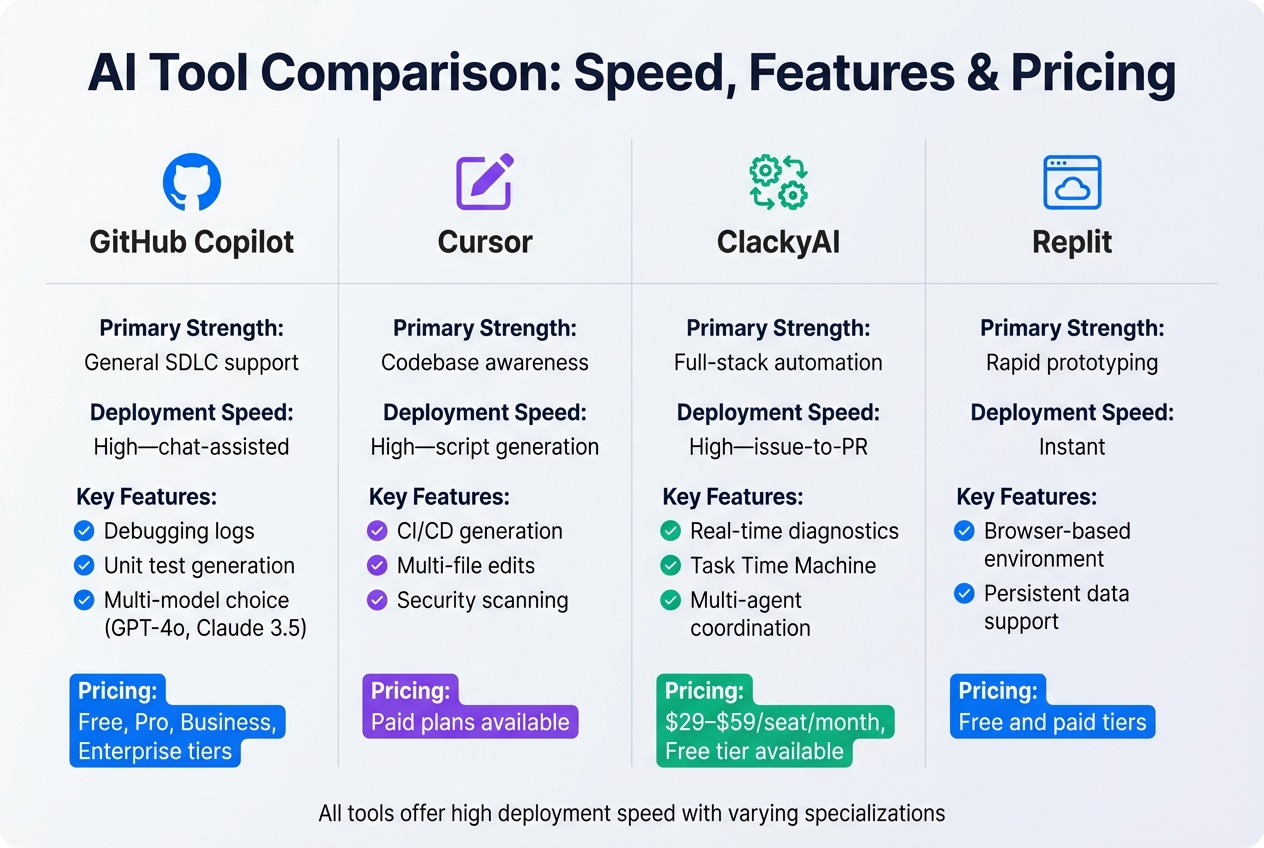
AI Development Tools Comparison: Features, Speed, and Pricing
Teams across industries are already tapping into AI to speed up and refine their workflows, building on the tool-specific advantages we've discussed earlier.
Data from real-world use cases shows that AI tools significantly cut deployment times. Take SmartDev, a global software company, for example. In October 2025, they rolled out an "AI-First" lifecycle across more than 300 projects. The results? Their AI-certified teams reduced post-release bugs by 40% and tripled the speed of pull request turnarounds. A standout success was their work on the VeryPay platform, which earned the prestigious 2024 Sao Khue Innovation Award for its mobile money technology [1]. As SmartDev aptly puts it:
"AI doesn't replace developers - it amplifies their talent." [1]
The benefits go beyond overall performance metrics, extending into specific AI-powered features. GitHub Copilot, for instance, continues to make waves with its "Coding Agent" feature. As of October 2025, it automates drafting for 1.2 million pull requests every month. This includes generating code, writing tests, and summarizing project contexts, allowing developers to focus on more strategic work [14]. An internal study by Accenture involving 450 developers found that teams using GitHub Copilot achieved higher throughput and better code quality compared to those not using AI tools [15].
Case Study: Cursor and Replit for Faster Deployments

Platforms like Cursor and Replit showcase how AI is transforming deployment workflows. Cursor simplifies complex tasks by generating complete CI/CD configurations from plain English descriptions. It dynamically creates YAML files for processes like building Docker images and deploying to AWS, even debugging pipelines automatically [13].
Replit, on the other hand, focuses on products requiring persistent data and internal tools. It’s a go-to for teams looking to move beyond static mockups and validate their ideas with working prototypes. Both tools enable teams to achieve what’s often called "clickable clarity" - testing and validating features in real environments before committing to full-scale production [17].
AI Tool Comparison
To highlight the strengths of these tools, here’s a side-by-side comparison of their speed, cost, and features:
| Tool | Primary Strength | Deployment Speed | Key Features | Pricing |
|---|---|---|---|---|
| GitHub Copilot | General SDLC support | High - chat-assisted | Debugging logs, unit test generation, multi-model choice (GPT-4o, Claude 3.5) [16][9] | Free, Pro, Business, Enterprise tiers [9] |
| Cursor | Codebase awareness | High - script generation | CI/CD generation, multi-file edits, security scanning [13] | Paid plans available |
| ClackyAI | Full-stack automation | High - issue-to-PR | Real-time diagnostics, Task Time Machine, multi-agent coordination | $29–$59/seat/month, Free tier available |
| Replit | Rapid prototyping | Instant | Browser-based environment, persistent data support [17] | Free and paid tiers |
The cost savings are hard to ignore. AI-generated code costs about $0.002 per line, compared to roughly $12 per line for human-written code [15]. Developers using AI suggestions complete tasks 55.8% faster on average, and AI-driven testing systems can generate comprehensive test suites with over 70% efficiency [15]. GitHub Copilot alone has a massive user base of over 20 million, with more than 3 billion accepted code suggestions - most delivered in under 400 milliseconds [14].
sbb-itb-c336128
How to Add AI Tools to Your Workflow
Bringing AI tools into your development process doesn’t have to be complicated. The trick is to start small - introduce AI in ways that add immediate value while keeping your team’s workflow intact. Many organizations can get basic AI-powered pipelines running in less than 30 minutes [18]. These tools can help speed up development and tackle the bottlenecks that slow down your cycles. Let’s explore how to weave these AI-driven tools into your CI/CD workflow.
Setting Up AI-Powered CI/CD Pipelines
AWS CodePipeline paired with the Copilot CLI makes automated deployments straightforward. To get started, use copilot pipeline init to set up your pipeline, commit the generated artifacts, and deploy with copilot pipeline deploy [8]. The manifest.yml file gives you control over deployment order, manual approval gates, and pre- or post-deployment actions like database migrations. If your team runs tests before pushing to production, you can use the test_commands field to automate unit or integration tests [8].
GitHub Copilot Chat takes things further by transforming natural language prompts (like "deploy a Node.js app to AWS EC2") into fully functional GitHub Actions workflows. These workflows handle building, testing, and deploying your application. It also analyzes deployment logs in real time, flags issues, and suggests fixes [16]. By automating these steps, your team can release faster with fewer manual interventions.
Once your CI/CD pipeline is running smoothly, the next step is to secure your deployments by automating infrastructure management.
Automating Infrastructure with Terraform
Terraform makes managing infrastructure more efficient and reliable. Start by using terraform validate to catch errors before deployment. To enforce consistent code quality, set up pre-commit hooks that run terraform fmt and terraform validate every time you commit changes [11].
If you’re working with legacy systems, GitHub Copilot’s "Edits" mode can suggest updates and generate moved.tf blocks to handle state transformations without disrupting existing resources [5]. To protect against resource corruption when multiple team members are working simultaneously, enable S3 bucket versioning and DynamoDB state locking [11]. Scheduling weekly drift detection can help you spot manual changes that deviate from your AI-managed code. For production environments, tools like tflint (for provider-specific best practices) and tfsec (for security scanning) can catch potential misconfigurations before they go live [11].
ClackyAI simplifies the process even further by automating issue-to-PR workflows and maintaining a deep understanding of your codebase. Its real-time diagnostics and Task Time Machine feature allow you to track every AI-driven change, while its multi-agent coordination ensures consistency across your infrastructure.
Conclusion: What to Do Next
AI tools are reshaping how development teams work, transforming what used to be slow and tedious processes into faster, more efficient workflows. Traditional sprints are being replaced by shorter, more dynamic cycles called "bolts", where tasks are completed in hours or days instead of weeks [3]. For organizations that embrace AI-driven development, the payoff is quick - most see a return on investment (ROI) within 6–12 months [1]. Teams equipped with AI tools are delivering results 30–50% faster compared to traditional approaches [1].
What's Next for AI in Development
The role of developers is undergoing a major shift. As CircleCI explains, "When AI can generate ten solutions quickly, the valuable skill becomes choosing the right one for your context" [4]. This means senior engineers are now focusing more on decision-making, architectural planning, and selecting the best AI-generated solutions for their projects [4]. The software development lifecycle is evolving, moving away from a step-by-step process to a more interconnected model where planning, designing, and testing often happen simultaneously [4].
Looking ahead, autonomous validation is set to be a game changer. AI agents will take on tasks like monitoring pipelines, fixing issues proactively, and continuously validating readiness - reducing the need for constant human intervention during deployments [4]. To keep up, teams will need to upgrade their CI/CD systems to handle the increased speed and volume of AI-generated code. Selecting the right tools to address specific challenges will be critical as development workflows continue to evolve.
How to Choose the Right AI Tools
Start by identifying the biggest bottleneck in your workflow. Is it infrastructure validation? Manual code reviews? Deployment speed? Once you pinpoint the issue, choose tools tailored to the specific phase of the software development lifecycle (SDLC) that's slowing you down [4]. For example:
- Use tools like Copilot Chat or Amazon Q to streamline planning.
- Opt for Edit Mode to maintain precise control over code.
- Select Agent Mode for automating tasks like creating pull requests [19].
Budget considerations are also key. AWS offers up to $200 in free credits for new customers, making it easier to experiment with AI services without upfront costs [20]. For team adoption, consider a tiered approach: AI Practitioners who use basic tools, Power Users who optimize workflows, and Integrators who build custom tools [1]. Start small with pilot projects to test the benefits before scaling up across your organization. Treat your developer experience like a product by conducting quarterly reviews of your CI/CD pipeline. Analyze build times and error rates to uncover new areas where AI can make an impact [2].
For those looking at specific solutions, ClackyAI offers flexible pricing. The Pro plan ($29/seat/month) includes 2,000 monthly credits and supports 15–20 collaborative tasks, while the Business plan ($59/seat/month) scales up to 30–40 tasks with enhanced computing resources. Both plans come with tools like the Task Time Machine, which tracks AI-driven changes, and multi-agent coordination to ensure consistency across your infrastructure.
FAQs
How do AI tools like GitHub Copilot and AWS CodePipeline help speed up software development?
AI tools such as GitHub Copilot and AWS CodePipeline are game-changers in software development, streamlining workflows and cutting down on manual tasks. GitHub Copilot stands out by providing smart code suggestions, assisting with test creation, and even helping to configure CI/CD pipelines. This allows developers to dedicate more time to tackling complex challenges rather than routine coding.
On the other hand, AWS CodePipeline simplifies the build, test, and deployment process by automating it from start to finish. This creates a smooth, efficient workflow that speeds up the delivery of production-ready applications. When used together, these tools help teams eliminate bottlenecks and deliver high-quality software faster than ever.
How does integrating AI improve the software development process?
Integrating AI into software development can dramatically boost efficiency by taking over repetitive tasks like code scaffolding, generating tests, and setting up CI/CD pipelines. With these time-consuming chores off their plate, developers can channel their energy into solving complex problems and delivering top-notch solutions more quickly. Tools like GitHub Copilot and AWS CodePipeline further enhance productivity by suggesting code improvements, automating pull requests, and simplifying code reviews.
But it’s not just about speed - AI also promotes smarter collaboration and decision-making. It enables teams to anticipate bottlenecks, fine-tune workflows, and uphold high software quality. By weaving AI into every stage - coding, testing, and deployment - organizations can shorten time-to-market, build more resilient systems, and stay ahead of the competition with streamlined, intelligent workflows.
How can AI tools help reduce bugs and speed up code reviews?
AI tools like GitHub Copilot can make coding much more efficient by offering precise, well-structured code suggestions as you type. They also help catch potential problems early, cutting down on the number of bugs that slip through to the review phase.
By giving relevant context and handling repetitive tasks, these tools free up developers and reviewers to concentrate on the more crucial parts of the code. This boosts code quality and allows teams to review and merge pull requests more quickly, speeding up development timelines overall.