


How to Track AI Code Changes in Your Project
When managing AI projects, keeping track of code, data, and model changes is not just helpful - it’s essential. Without proper tracking, debugging issues, reproducing results, and ensuring compliance become nearly impossible. Tools like Git, DVC, and MLflow provide a structured way to manage these complexities by versioning code, datasets, and experiments. For added transparency, ClackyAI offers detailed auditing of AI-driven code modifications.
Key Takeaways:
- Organize your project: Use a clear directory structure (
data/raw/,src/,models/, etc.) for better clarity. - Use Git and DVC: Git handles code, while DVC manages large datasets and model files efficiently.
- Track experiments with MLflow: Log hyperparameters, metrics, and artifacts for reproducibility and comparisons.
- Audit AI changes with ClackyAI: Gain visibility into every AI-driven code modification.
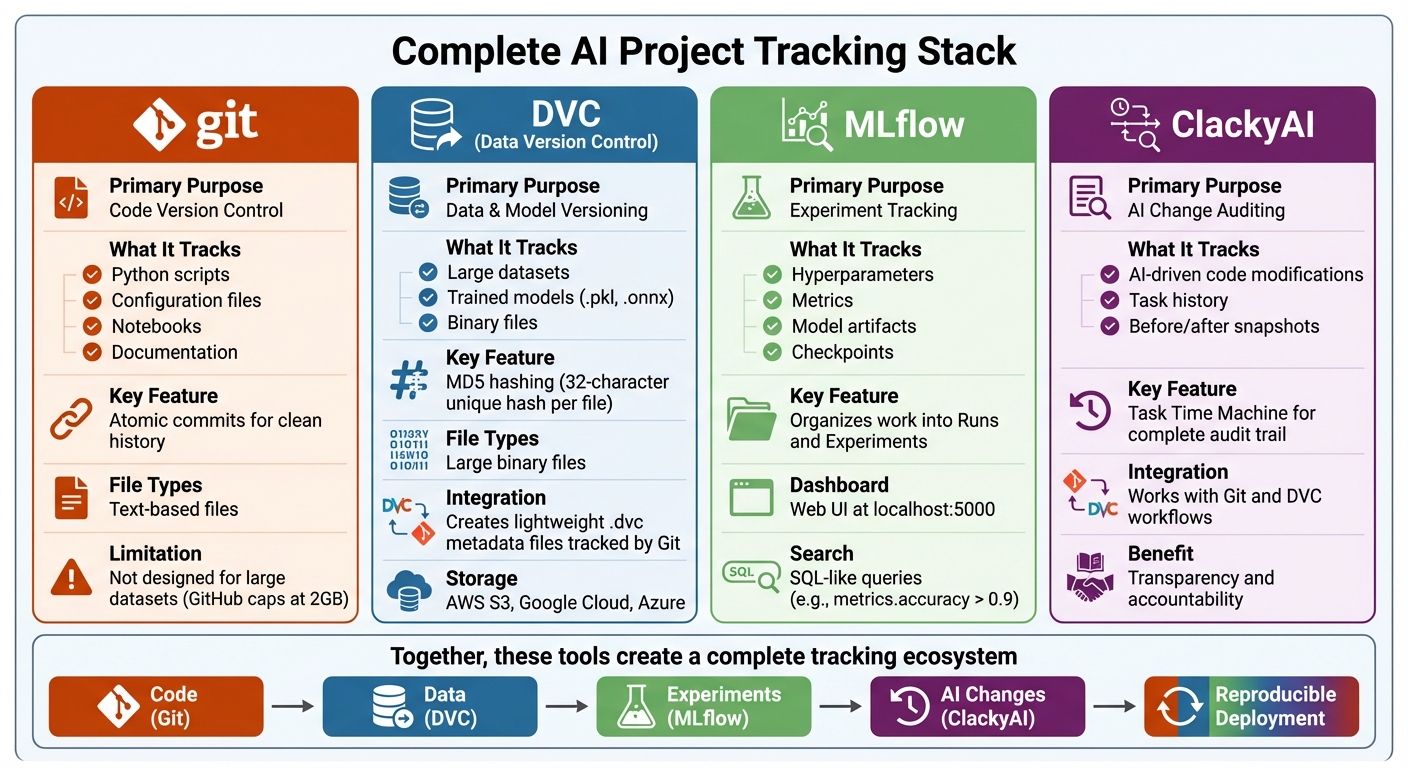
AI Project Tracking Tools Comparison: Git, DVC, MLflow, and ClackyAI
Stop Vibe Coding: The AI Development Framework That Actually Works
Building a Practical AI Project Structure
To keep your AI project organized and efficient, it's essential to follow a structured approach. Start by storing immutable raw data in data/raw/, transformed data in data/processed/, and trained models in models/. This structure not only simplifies tracking changes but also ensures clarity in your workflow.
Standard Directory Layout
A well-organized directory layout makes all the difference. Begin by separating text-based files (managed with Git) from large binary files (handled by DVC). Here’s a suggested structure:
data/raw/: This folder holds your original datasets. These files remain untouched and act as your "source of truth."data/processed/: Store transformed data here. If you create engineered features, consider placing them in a dedicateddata/features/folder.src/: This directory is for all your Python scripts - housing the core logic and production-ready code.notebooks/: Ideal for exploratory analysis and prototyping before transitioning to production pipelines.models/: Use this folder for trained artifacts like.pklor.onnxfiles, with DVC managing them through lightweight.dvcmetafiles.
To streamline your workflow, include configuration files like params.yaml to centralize hyperparameters and file paths. This ensures consistency across tools like DVC and experiment tracking systems. Don’t forget to add .gitignore and .dvcignore files to exclude large datasets and temporary outputs from version control.
One crucial principle is to transfer the core logic from Jupyter Notebooks into Python scripts within the src/ directory. As Justin Boylan-Toomey, a Lead Machine Learning Engineer, aptly puts it:
"Reproducible data science projects are those that allow others to recreate and build upon your analysis as well as easily reuse and modify your code."
While notebooks are great for exploration, they often hinder reproducibility. By moving key logic to Python scripts, you enable better version control, easier testing, and a more maintainable codebase.
Managing Dependencies
Dependency management is another cornerstone of a robust AI project. To avoid compatibility issues, pin package versions in requirements.txt (e.g., tensorflow==2.12.0). For projects requiring GPU support or native libraries, Conda can help manage system-level dependencies that pip might struggle with.
Here are some steps to ensure smooth dependency management:
- Use
pip freeze > requirements.txtto capture all dependencies. - Run
pip checkto identify any conflicts early. - Consider tools like Poetry or Pipenv for deterministic builds using lock files.
- Employ Docker to encapsulate your entire system environment for production deployment.
Finally, document the setup process in your README.md file. A clear setup guide ensures that new team members can get up and running without unnecessary confusion. By locking down dependencies and providing clear documentation, you set the stage for reliable versioning and seamless deployment.
Versioning Code and Data with Git and DVC
Git is fantastic for keeping track of text-based files, but it's not designed to handle the enormous datasets or model files that AI projects often require. With GitHub typically capping repositories at 2 GB, managing multi-gigabyte training datasets becomes a challenge [9]. That’s where DVC (Data Version Control) steps in, bridging the gap between Git and your data storage solution.
Git for Code Versioning
Git shines when it comes to managing your codebase. Use it to track Python scripts, configuration files, notebooks, and documentation. To keep your project history clean, aim for atomic commits - each commit should represent a single logical change. This practice makes debugging easier and helps maintain a clear project timeline [10][11].
When working on new features or experiments, create separate branches. Before merging into your main branch, use interactive rebasing (git rebase -i) to tidy up "work in progress" commits [10]. This ensures your commit history is polished and easy to follow.
Git is widely adopted, so most teams are already familiar with commands like git add, git commit, and git checkout. However, for managing large datasets and models, you'll need more than just Git. That’s where DVC comes in.
DVC for Data and Model Versioning
DVC complements Git by creating lightweight .dvc metadata files. These files contain MD5 hashes that track large datasets or models. While Git handles the .dvc files, the actual data is stored separately - in a cache or remote storage like AWS S3, Google Cloud Storage, or Azure [12][7].
For example, when you run dvc add data/raw/training_data.csv, DVC moves the original file to its cache and automatically updates .gitignore to prevent Git from tracking the large file directly [7][8]. Afterward, you can version the dataset by running git add training_data.csv.dvc and git commit [7][8].
Switching between dataset versions is simple: use git checkout <branch> to change your code branch, then run dvc checkout to sync the datasets with the code [7][8]. For collaborative projects, you can set up a shared remote storage with a command like dvc remote add -d myremote s3://mybucket/data. Use dvc push to upload data to the remote, and teammates can retrieve the latest versions with dvc pull after a git pull [7][4].
DVC’s MD5 hashing system is a game-changer. It generates a unique 32-character hash for every file. Even the smallest change in a dataset results in a completely new hash, ensuring that every version is accurately tracked [12]. This approach is far more reliable than timestamp-based tools, which can mistakenly trigger unnecessary model retraining when only the file’s timestamp changes, not its content [9].
Up next, we’ll look at how MLflow builds on these practices to help track experiments effectively.
Tracking Experiments with MLflow
MLflow works alongside tools like Git and DVC to keep track of everything happening during your model training - hyperparameters, metrics, and even model artifacts. It organizes your work into Runs (individual training sessions) and Experiments (groups of related runs), making it easier to compare results and recreate successful models [13][14].
Setting Up MLflow for Experiment Tracking
To get started, install MLflow with pip install mlflow. Once installed, you can launch the tracking server on port 5000 using mlflow server --port 5000 [13][15]. This opens a dashboard at http://localhost:5000, where you can view and compare metrics from different runs side-by-side [13][15].
In your training script, define an experiment name with mlflow.set_experiment("Experiment Name"). Then, wrap your training code with mlflow.start_run() [13][15]. This setup ensures that all relevant metadata is captured, even if the script crashes during execution.
If you're working as part of a team, you can configure a remote MLflow backend. For example, you can use PostgreSQL or MySQL to store metadata and services like S3 or Azure for artifacts [13][16]. This allows everyone on the team to access the same experiment history and collaborate seamlessly.
Logging and Comparing Results
MLflow makes it simple to log and track everything. Use mlflow.log_param for hyperparameters, mlflow.log_metric for performance metrics, or enable mlflow.autolog() for frameworks like PyTorch, Scikit-learn, or XGBoost [13][15]. With the release of MLflow 3, you can now link metrics directly to specific model checkpoints and datasets using the model_id and dataset parameters. This creates a clear chain connecting your data to your results [13].
To identify your top-performing models, use mlflow.search_logged_models() with SQL-like queries. For instance, you can filter for models with metrics.accuracy > 0.9 to quickly find the best performers across all experiments [13]. You can also use mlflow.set_tag() to add searchable metadata, such as "model_type" or "data_version", making it easier to find specific runs later [15].
For deep learning workflows, log model checkpoints at different stages of training by using the step parameter in log_model. This allows you to compare early and late-stage performance within the same run [13]. If you're working on GenAI projects, MLflow offers a handy feature: mlflow.genai.enable_git_model_versioning(). This automatically tracks the Git branch, commit hash, and any uncommitted changes, ensuring every experiment is tied to a specific code state [2][1].
With MLflow's detailed tracking capabilities, you're well-prepared to integrate additional auditing tools in the next steps.
sbb-itb-c336128
Using ClackyAI for AI Change Auditing
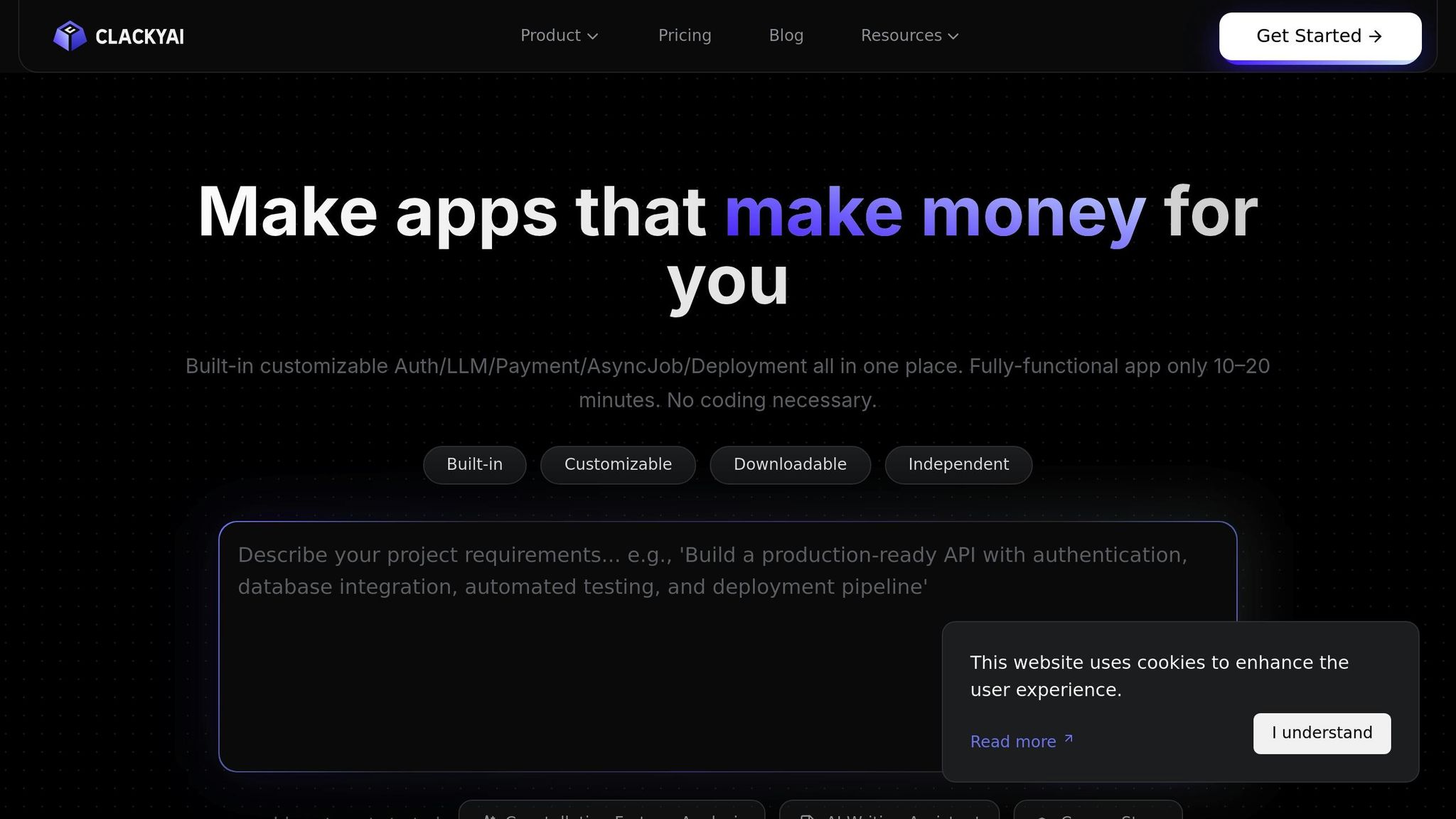
While MLflow handles experiment tracking, monitoring code changes - whether by developers or AI agents - requires a tool like ClackyAI. It completes the tracking ecosystem by capturing all modifications, ensuring transparency and avoiding integration headaches. This is especially helpful when multiple team members or AI agents are working on the same codebase. Let’s dive into how ClackyAI's Task Time Machine provides detailed insights into these changes.
ClackyAI's Task Time Machine
The Task Time Machine is a standout feature of ClackyAI, offering a comprehensive view of every single modification made during AI-assisted development. Instead of guessing what an AI agent might have altered in your codebase, this tool gives you access to a complete history of changes tied to specific tasks. It doesn’t just document the final code - it also tracks incremental steps, making it a powerful tool for debugging and rollbacks.
By maintaining a detailed audit trail, including clear before-and-after snapshots of your code, the Task Time Machine becomes invaluable when troubleshooting issues after AI-generated code merges. If a bug or performance issue arises, you can trace back through the timeline to identify the exact change responsible. This eliminates the frustration of the "it worked yesterday" problem that can crop up in AI-driven projects. Now, let’s explore how ClackyAI works seamlessly with Git and DVC workflows.
Integrating ClackyAI with Git and DVC
ClackyAI fits neatly into existing Git and DVC setups by tracking metadata for large AI-related assets. For example, when you use dvc add <file_path> to track datasets or model weights, DVC creates lightweight .dvc metadata files that Git can manage.
To avoid cluttering your repository with large files, add them to .gitignore and commit only the .dvc metadata to Git. Remote storage solutions like Amazon S3, Azure Blob Storage, or Google Cloud Storage can be configured using dvc remote add, enabling your team to share tracked data efficiently via dvc push and dvc pull. For version control, you can revert code with git checkout <commit_hash> and synchronize corresponding data using dvc checkout.
"DVC matches the right versions of data, code, and models for you" [3].
Building Deployment Pipelines with Multiple Tools
Combine Git, DVC, MLflow, and ClackyAI to create a seamless deployment pipeline that manages both code and model updates. Git handles version control for code and configuration files, while DVC specializes in managing large datasets. MLflow logs experiments, and ClackyAI provides an audit trail for AI changes. By enabling Git-based versioning with mlflow.genai.enable_git_model_versioning(), you can automatically link every MLflow run to a specific Git commit and branch. It even captures uncommitted "dirty" states for better traceability[2]. Meanwhile, ClackyAI's Task Time Machine adds an extra layer of accountability by recording the reasons behind AI changes and identifying the AI agent responsible.
To maintain consistency, use atomic commits that update code, dvc.lock files, and configurations all at once[5]. Centralize hyperparameters in a params.yaml file and reference them in both pipeline definitions and MLflow logs. This unified structure makes it easier to implement automated CI/CD workflows.
CI/CD Workflow for AI Projects
With a consolidated pipeline in place, you can automate deployments by setting up CI/CD triggers that ensure reproducibility checks are completed before any updates go live. Tools like CML (Continuous Machine Learning) or GitHub Actions can monitor changes to code or data dependencies. For example, a dvc repro command can be triggered automatically to re-run only the pipeline stages affected by those changes[17].
Consider the case of DeHaat, an AgriTech startup, which integrated GitHub, AWS SageMaker, and MLflow for automation. Their workflow enabled zero-code deployment and automated infrastructure scaling. Training artifacts were stored in S3, and instances were shut down automatically to reduce costs. As Ronit Ranjan aptly put it:
"Data scientists are trained in mathematics, statistics, and modeling - not necessarily in software engineering. But software development is usually required at every step of ML."[6]
Set up your CI pipeline to handle tasks like provisioning GPU resources, executing the DVC pipeline, running validation tests to check input/output shapes and performance thresholds, and then de-provisioning resources to save costs[6][17]. Use the dvc status command to detect dependency changes. If any are flagged, the pipeline will require a re-run before deployment[18].
Ensuring Reproducibility in Live Environments
Reproducibility in production is crucial for validating AI changes before they impact users. Start by implementing data validation in your CI pipeline. Use DVC to check out specific data versions and run sanity and schema checks prior to training[17]. Pin your software dependencies in requirements.txt or Conda environment files, and log them as MLflow artifacts for every run. This ensures consistent environments for training and deployment[5]. For GenAI applications, MLflow 3.4+ captures uncommitted changes as a diff, making it easier to reproduce results from local development before committing changes[2].
When moving models to production, prioritize promoting code alongside the models. As Databricks advises:
"In most situations, Databricks recommends that during the ML development process, you promote code, rather than models, from one environment to the next."[19]
This approach ensures all assets go through integration testing and code reviews. Use model aliases like "Champion" and "Challenger" in your registry to separate the deployment of new model versions from the inference code[19]. Additionally, set up automated retraining jobs triggered by new data or performance drift. ClackyAI's Task Time Machine can help maintain a detailed record of changes, making it easier to track what was modified, when, and why throughout the pipeline.
Conclusion
Keeping code, data, and models in sync through unified versioning is the backbone of reproducibility. Without a structured approach, development can spiral into confusion, and deployments turn into high-stakes gambles. By integrating tools like Git for code, DVC for data and models, MLflow for experiments, and ClackyAI for audit trails, you can avoid the dreaded "it worked yesterday" scenario. This framework ensures every result is traceable and repeatable.
The secret lies in systematic metadata tracking. Lightweight metafiles like .dvc keep your repository clean while maintaining a detailed record of data versions within Git commits. For GenAI workflows, this means capturing prompts, configurations, evaluations, and even uncommitted changes to ensure nothing slips through the cracks.
"Data science and ML are iterative processes where the lifecycles of data, models, and code happen at different paces. DVC helps you manage, and enforce them." - DVC Documentation
On top of this, auditability adds another layer of reliability to your deployment process. By maintaining an immutable history of when datasets or models were approved - and why - you simplify compliance and tracking. Linking code and artifacts through unique Git commit hashes and automating trace association ensures every experiment ties back to a specific application version. A model registry can then handle the lifecycle from development to production, while separating productive code from logging code keeps your repository clean. Finally, using objective metrics like toxicity, latency, and quality scores for side-by-side comparisons takes the guesswork out of version selection. Combined, these practices create a smooth, reproducible pipeline for deploying AI systems.
FAQs
What role does ClackyAI play in improving transparency for AI-related code changes?
It seems there’s no information currently available about a tool or service named ClackyAI, particularly regarding its role in improving transparency in AI-related code modifications. If you can share more details or point to a reliable source about its functionalities, I’d be glad to help explain further.
What are the advantages of using DVC for managing datasets and models in AI projects?
DVC simplifies managing large datasets and models by integrating them with version control alongside your code. This allows you to track changes effortlessly while ensuring reproducibility. With external file storage, your Git repositories remain lightweight, yet you still get a clear history of updates to your data and models.
Collaboration becomes more efficient, too. DVC tracks data lineage and experiments, keeping teams organized and aligned. This leads to smoother workflows and more dependable deployments in production environments.
How does MLflow help track experiments and ensure reproducibility in AI projects?
MLflow makes tracking experiments straightforward while improving reproducibility. It logs essential details for each run, including parameters, metrics, code versions, and output artifacts. Plus, it organizes these runs into searchable experiments, allowing for easy comparison and analysis of results.
On top of that, MLflow automatically records Git metadata - like branch names, commit hashes, and any changes - ensuring you can reliably rerun experiments. This feature helps maintain consistency in AI workflows, even when dealing with intricate projects.