






Ultimate Guide to AI-Powered Development Workflow
AI is changing how developers work. From automating repetitive tasks to generating code and improving software quality, AI tools are transforming workflows. Here’s what you need to know:
- Efficiency Boost: AI tools can cut development time by up to 80% and improve productivity by 16%-30%.
- Key Areas of Impact: Developers use AI for testing (80%), documentation (81%), and writing (76%).
- Independent Developers: AI assistants help manage larger codebases and reduce onboarding time.
- Non-Technical Users: Tools enable prototype creation without coding.
Getting Started:
- Set up your workspace with version control (e.g., Git) and context management files.
- Choose tools that fit your needs - options include Cursor for deep coding, Bolt for prototyping, and ClackyAI for end-to-end automation.
Planning & Development:
- Define clear goals, data sources, and performance benchmarks.
- Use iterative workflows to test and refine your product.
- Start small with proof-of-concept projects to measure AI's impact.
Testing & Deployment:
- Automate testing to catch bugs early and maintain quality.
- Use tools like Mintlify for up-to-date documentation.
- Deploy with CI/CD pipelines and tools like AWS CDK for consistent environments.
Scaling:
- Monitor performance and balance costs with tools like API gateways and inference routers.
- Share AI capabilities across teams to maximize impact.
AI workflows are reshaping development, improving speed, quality, and productivity. Start small, measure results, and scale strategically to make the most of these tools.
My Workflow With AI: How I Code, Test, and Deploy Faster Than Ever
sbb-itb-c336128
Setting Up Your AI Development Environment
AI Development Tools Comparison: Features, Pricing, and Limitations
Preparing Your Workspace
To get started, make sure your workspace is equipped with Git version control for tracking changes and maintaining clarity in your projects. For environments like Model Context Protocol servers, ensure you're using the right setup - such as Node.js 18+ - to seamlessly link AI tools with external documentation.
Context management is a game-changer for modern AI-integrated development. Many AI IDEs now allow you to use @-mentions to reference files, patterns, or documentation, making it easier to integrate code cohesively. To maintain consistency, create a .cursorrules file. This file should outline your coding standards, naming conventions, and architectural guidelines. Make it a habit to update this file every week to reflect any changes or improvements in your workflow.
"The model needs context about your architecture, patterns, and conventions. Generate and update your Cursor Rules regularly." - DeveloperToolkit.ai
If you're working on tasks that take longer than five minutes, enable MAX mode in Cursor. This ensures the AI can handle more complex workflows. Use @-mentions to direct the AI to existing components, helping you avoid redundant work and focus on building efficiently.
Once your workspace is set up, it's time to choose tools that align with your development needs and workflow.
Choosing the Right AI Tools
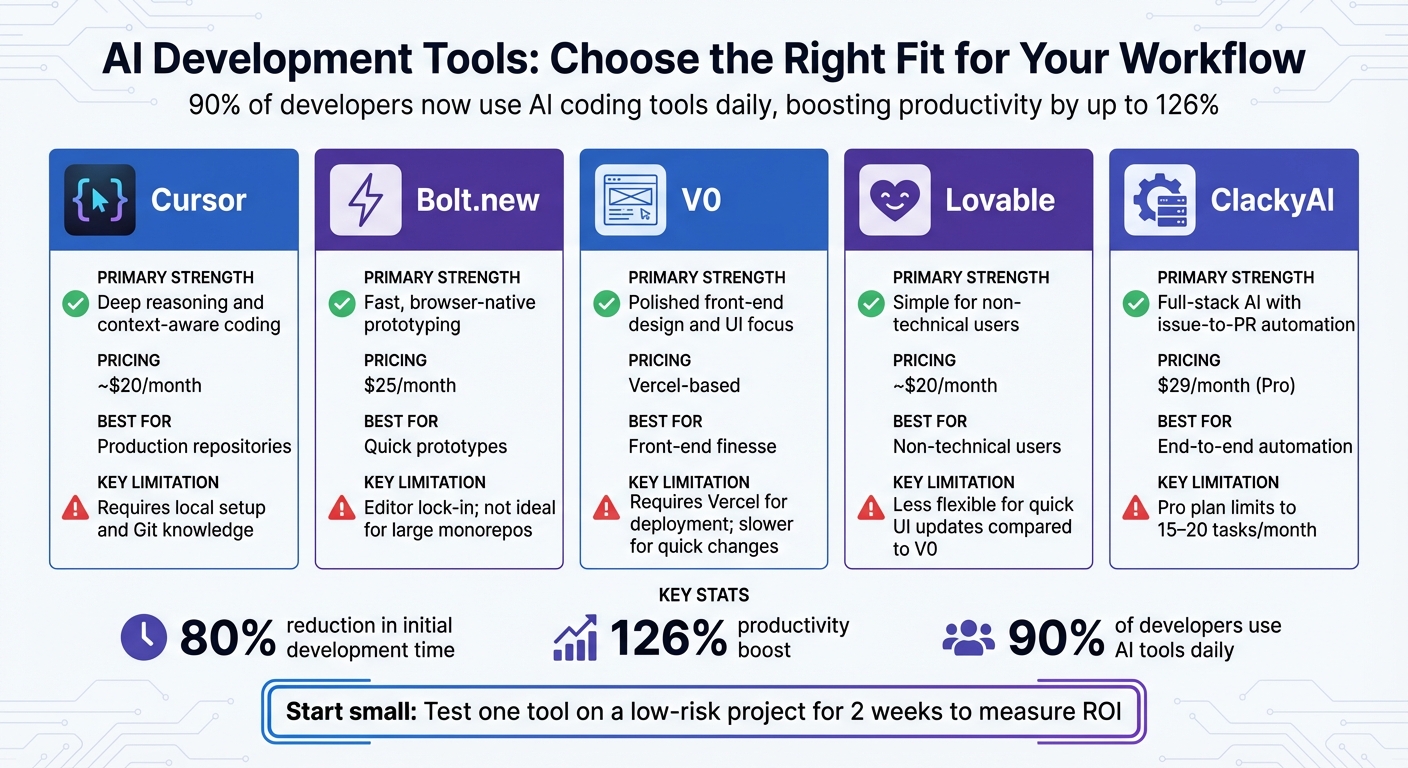
Did you know that 90% of developers are now using AI coding tools daily? These tools have been shown to boost productivity by up to 126% and cut initial development time by as much as 80% [1]. With such impressive stats, selecting the right tool for your needs is crucial.
Here’s a breakdown of some popular AI tools and their strengths:
| Tool | Primary Strength | Pricing (USD) | Key Limitations |
|---|---|---|---|
| Cursor | Deep reasoning and context-aware coding | ~$20/mo | Requires local setup and Git knowledge |
| Bolt.new | Fast, browser-native prototyping | $25/mo | Editor lock-in; not ideal for large monorepos |
| V0 | Polished front-end design and UI focus | Vercel-based | Requires Vercel for deployment; slower for quick changes |
| Lovable | Simple for non-technical users | ~$20/mo | Less flexible for quick UI updates compared to V0 |
| ClackyAI | Full-stack AI with issue-to-PR automation | $29/mo (Pro) | Pro plan limits you to 15–20 tasks/month |
Cursor is excellent for production repositories, offering deep context-aware coding, but it does require some technical know-how and local setup. On the other hand, Bolt.new is a browser-based solution that’s perfect for quick prototypes, though it’s less suited for large-scale production work. If front-end finesse is your focus, V0 stands out, particularly for those already using Vercel. Meanwhile, Lovable caters to non-technical users seeking simplicity, and ClackyAI provides a full-stack solution with advanced features like issue-to-PR automation.
A smart approach? Start small. Pick one tool and test it on a low-risk project for two weeks. This will help you measure its return on investment before rolling it out to your entire team [1]. For example, in 2025, a 50-person development team that integrated AI agents into their CI/CD pipelines saved over 200 hours of manual work every month and cut deployment cycles by 75% [1]. Imagine what that kind of efficiency could do for your projects!
Planning and Roadmapping Your AI Project
Defining Your Project Goals and Scope
Before diving into the coding phase, take a moment to confirm whether AI is the right solution for your project. For tasks with predictable, rule-based outcomes, traditional logic-based systems might suffice [5]. On the other hand, generative AI excels in areas like creating new content, handling dynamic queries, or synthesizing information.
Start by clearly outlining your user experience requirements. Ask yourself: What kinds of requests will users typically make? Will the responses need to be in the form of code snippets, detailed prose, or structured data? How should the system deal with ambiguous or unclear queries? Once you've nailed this down, take stock of your data sources - both structured (like SQL databases or Delta tables) and unstructured (such as PDFs or HTML files). Evaluate their quality and how often they’re updated [5].
Next, define your performance benchmarks. Metrics like time to first token (TTFT), overall response time, and the ability to handle concurrent users are critical. Also, set a clear monthly inference budget in USD to avoid overspending. To keep priorities clear, use a tiered system: P0 for must-haves like security and essential functionality, P1 for important but not urgent features, and P2 for enhancements that can wait [5][7].
Your evaluation metrics should tie directly to business goals. For instance, if you’re building an AI-powered support assistant, track metrics like the rate of support ticket resolution. Pair these with quality measures such as accuracy, relevance, and safety. Early on, implement human-in-the-loop feedback systems - they’ll be invaluable as you refine the system [4][5].
With your objectives and metrics in place, you’re ready to chart out your development path.
Creating a Development Roadmap
AI projects thrive on an iterative process: build, test, evaluate, and refine based on real-world feedback [7].
Organize your roadmap into stages of maturity. Level 1 might involve using AI manually for isolated tasks. Level 2 could focus on automating workflows where AI handles routine jobs with some human oversight. Level 3 would aim for fully automated, zero-intervention workflows for low-risk processes [6]. For example, an eight-week phased plan might include: initial setup, integrating AI into workflows, optimizing with targeted review, and scaling through cross-project learning [3].
Start small with a proof-of-concept. Use a representative subset of your data and essential tools to test the waters [5][7]. Keep individual components compact - under 5,000 lines of code, including documentation - so they’re easier to manage and fit within AI context windows [3]. Focus your initial milestone on solving one specific pain point, such as streamlining code reviews [6][8].
"Governance starts with trust, and trust starts with evidence." – Mindgard [9]
Decide early whether to use open-source frameworks like LangChain for speed or stick to pure Python for maximum flexibility [7]. Throughout the process, monitor your intervention rate - how often humans need to step in and correct the AI’s output. This metric is a reliable indicator of how mature and dependable your automated workflows have become [6].
Building and Iterating Your AI-Powered Product
AI-Driven Design and Architecture
Using your roadmap as a guide, structure your AI system into modular microservices - such as data ingestion, RAG retrievers, and model abstraction layers - to help isolate potential issues. Integrate an AI gateway to streamline authentication, security, and load balancing across various LLM providers. To balance cost and performance, implement a tiered model approach: use fast, low-cost models for simpler tasks and escalate to more advanced models only when necessary.
Adopt a context-first design by creating both machine-readable files like .claude/settings.json and human-readable documentation such as CLAUDE.md to define architectural standards and business constraints. As solution architect Sudhir Mangla explains:
"AI is only as useful as the context you provide."
Keep components concise and focused, as previously advised. Once your architecture is solid, shift to an iterative development approach to refine your product quickly and effectively.
Iterative Development Workflow
With your architecture in place, follow a structured plan–execute–verify cycle. Leverage AI as a research assistant to generate detailed task breakdowns, including file structures and method signatures, ensuring alignment with your architectural goals from the outset.
During the execution phase, maintain quality through CI/CD pipelines equipped with static linters, formatters, and automated tests. Developer Michal Villnow demonstrated the potential of this approach in September 2025 by conducting a one-month experiment where AI generated 99.9% of the code. By employing a seven-layer prompt hierarchy and modular design principles, Villnow achieved remarkable outcomes: 197,000 lines of code written, 98 GitHub issues resolved, and 180 pull requests merged. This process resulted in a 75% reduction in production bugs and accelerated feature delivery by 60–80% compared to traditional methods [3].
To maintain momentum, rely on rapid feedback loops. Regularly evaluate your AI's performance through build–evaluate–iterate cycles, refining agent logic based on real-world data. Address bottlenecks in code review by separating interfaces from implementations, allowing AI agents to work independently on specific components without disrupting the system's overall integrity.
Testing, Documentation, and Automation
When scaling AI-powered products, it's not just about building iteratively; rigorous testing and clear documentation are equally vital to ensure reliability and growth.
Automated Testing and Debugging
Once your product has gone through iterative refinements, rigorous testing becomes the backbone of its reliability. For AI-powered products, incorporating quality gates in your CI/CD pipeline is non-negotiable. These gates should include static linters, formatters, security tools like OWASP and Snyk, and a mix of unit, integration, and performance tests. Michal Villnow highlights the importance of this approach:
"Robust CI/CD pipelines are essential for quality control." [3]
AI can play a key role here. Use it to auto-generate test suites that capture edge cases often overlooked by manual testing. Incorporate evaluations (also known as evals) to compare AI output against ground truth datasets [11], and implement guardrails to block unsafe inputs in real-time.
For instance, engineering teams leveraging AI-driven code review tools like Graphite have reported a 40% drop in bugs reaching production and a 60% cut in manual review time [10].
To enhance debugging, store tests, documentation, and code in the same repository. This gives AI agents the full context they need for efficient issue resolution. Keep individual components under 5,000 lines of code so they stay within AI model context limits for analysis [3]. Additionally, track your intervention rate - how often humans need to step in to correct AI-generated code or tests - as a key metric of your system's maturity [6].
Streamlining Documentation and CI/CD
Once your testing processes are in place, the next step is to streamline documentation and deployment workflows. Tools like Mintlify are designed for AI-native environments, ensuring that documentation stays up-to-date as your product evolves. These platforms support standards like llms.txt and the Model Context Protocol (MCP), making documentation accessible to both human developers and AI agents. Companies such as Anthropic rely on Mintlify to enhance the developer experience for their products, including the Claude API, MCP, and Claude Code [12].
For deployment, version prompts in source control (e.g., YAML files) and enforce reviews and regression tests before rolling out changes. Use Infrastructure as Code tools like AWS CDK or CloudFormation to maintain consistent environments. Post-deployment, run smoke tests using tools like Amazon CloudWatch Synthetics to validate outputs and ensure you're ready for a rollback if needed. Automating low-risk tasks, such as documentation updates, can further accelerate delivery timelines. As AWS Prescriptive Guidance points out, CI/CD isn’t just a best practice - it’s essential for building scalable and reliable AI systems [13].
Deploying and Scaling Your AI Product
Deployment Best Practices
When it comes to deploying your AI product, it’s about much more than just pushing code to production. A solid deployment process includes integrating tools like static linters, formatters, security scanners (e.g., OWASP, Snyk), and performance benchmarks into every release cycle. These steps ensure your product is stable, secure, and ready for real-world use.
Take Replicate as an example. They’ve developed an open-source tool called cog-safe-push that automates key parts of the deployment pipeline. The process includes linting Python code, creating a private test model, and running fuzz tests for five minutes using the Anthropic Claude API to pinpoint potential issues. Only after all tests pass is the code pushed to production [14]. This kind of automated validation is a game-changer for catching edge cases before they impact users.
Another critical practice is separating staging and production environments. This minimizes the risk of live disruptions [2]. Using Infrastructure as Code (IaC) tools ensures consistent environments across these stages. For handling increasing demand, horizontal scaling - adding more servers to distribute the load - is far more reliable than overloading a single machine [2]. Additionally, enabling streaming with stream: true during text generation can significantly enhance user experience by returning tokens as they’re ready, reducing perceived latency [2].
For those seeking advanced workflows, platforms like ClackyAI offer cutting-edge features. Their AI-driven issue-to-PR automation, real-time debugging, and full codebase awareness streamline deployments. Plus, their cloud-based tools provide detailed analytics to track and optimize performance across your entire stack.
Once your deployment pipeline is solid, the next step is preparing to scale efficiently as demand grows.
Scaling for Growth
Scaling your AI product isn’t just about handling more users - it’s about balancing performance and cost as demand increases. Interestingly, only 8% of companies currently scale AI at an enterprise level, but those that do report cutting costs by 11% and boosting productivity by 13% within just 18 months [15]. The secret? Treat AI as a managed, shared capability rather than a series of isolated experiments.
Forward-thinking companies allocate around 51% of their tech budgets to cloud and AI [15]. They use tools like API gateways, inference routers, and caching to balance costs while maintaining low latency [16]. Monitoring your models with real-time KPIs - such as speed, cost-per-thousand-inferences, and reasoning quality - helps you quickly catch and address performance issues.
"The most dependable way to scale AI is through a shared platform. Identify what your workloads have in common... and then design those elements once for everyone to use."
– John Jainschigg, Director of Open Source Initiatives, Mirantis [16]
To maximize resources, pool GPU and storage capacity, ensuring nothing goes to waste. Set up billing notifications and tracking dashboards to prevent service interruptions caused by hitting quota limits [2]. These proactive measures make scaling not just feasible but sustainable for long-term growth.
Key Takeaways for AI-Powered Development
AI-powered workflows are reshaping how teams approach development and deployment, driving efficiency to new levels. Recent experiments highlight how AI-driven development not only cuts down on bugs but also speeds up delivery times. Industry stats back this up: AI workflows improve operational efficiency by 40% [17], slash testing time by up to 50% [18], and help 62.4% of developers learn faster [19]. Even a modest investment in AI tools can lead to massive productivity gains.
"AI workflow automation has evolved from a luxury to a necessity." – Dejan Markovic, Co-founder, Hype Studio [17]
These findings tie directly to earlier discussions about setting up strong, automated workflows. They also build on the broader exploration of how AI integrates across the development lifecycle.
To succeed in AI-powered development, teams must implement strict quality controls. AI-generated code should pass through rigorous CI/CD pipelines equipped with tools like static linters, security scanners, and performance benchmarks to ensure it meets the same standards as human-written code [3]. Modular architecture plays a big role too. By keeping components under 5,000 lines of code, teams ensure that AI agents can work effectively within their context windows while maintaining system clarity [3]. Using a layered prompt hierarchy - ranging from tool and language to project, personality, component, and task - further ensures consistent and reliable AI output [3].
The real competitive edge comes from treating AI as a shared platform capability rather than isolated experiments. Starting with high-volume, repetitive tasks builds trust across the organization, paving the way for automating more complex workflows over time [17]. Platforms like ClackyAI, which offer capabilities like AI-driven issue-to-PR automation, full codebase awareness, and real-time debugging, provide the foundation needed to scale AI adoption throughout the development lifecycle.
FAQs
How do AI tools help developers save time and boost productivity?
AI tools have revolutionized the way developers work, slashing development time by automating tedious tasks like writing boilerplate code, configuring environments, and handling dependencies. Tools like GitHub Copilot, Cursor, and Replit Agent can generate code snippets or even lay the foundation for entire projects using simple natural-language prompts. What used to take hours can now be done in just minutes.
But the benefits don’t stop at coding. AI is also reshaping debugging, testing, and code reviews. By analyzing codebases in real time, these tools can pinpoint issues and suggest fixes on the spot. Some advanced workflows even weave AI into the entire development pipeline, automating steps like gathering requirements, iterating on designs, and orchestrating tests. This means developers can spend more time tackling complex challenges, boosting productivity, and wrapping up projects faster than ever.
What are the best practices for creating an AI development environment?
To establish a dependable AI development setup, start with containerization to ensure consistency between local and cloud environments. Tools like Docker and Dev Containers let you define your entire stack - operating system, libraries, and GPU drivers - all in code. For example, you can use a .devcontainer.json file to specify IDE extensions, dependencies, and automation scripts. By committing this configuration to your repository, you enable your team to replicate the same environment effortlessly, cutting down on those frustrating "works on my machine" issues.
Next, integrate AI tools into your workflow through a CI/CD pipeline. This setup automates essential tasks like code linting, security checks, and model validation before deployment. Platforms like GitHub or Replit make collaboration easier, while AI-powered tools such as GitHub Copilot can assist with coding, debugging, and even prototyping directly in your IDE. By combining containerization, version control, and automation, you’ll build a development environment that’s both efficient and scalable.
How can people without technical skills use AI tools to create software?
AI-powered development tools have opened the door for non-technical users to create software without needing to write a single line of code. Take platforms like Replit’s AI App Builder, for example. Users can simply describe their app idea in plain English, and the system does the heavy lifting - generating the entire codebase, setting up databases, configuring authentication, and even managing deployment. And the best part? It all works seamlessly from a laptop or even a phone. This means students, entrepreneurs, and professionals can quickly bring their ideas to life without relying on a team of developers.
These tools are game-changers when it comes to saving time and cutting costs. What used to take weeks can now be done in just a few hours. By automating repetitive tasks, AI frees up teams to focus on the bigger picture - like strategy and innovation. By turning natural-language descriptions into fully functional apps, these tools make software development more accessible than ever, helping users deliver faster while keeping expenses down.